Where Is Power Button On Dell Laptop: Quick Location Guide

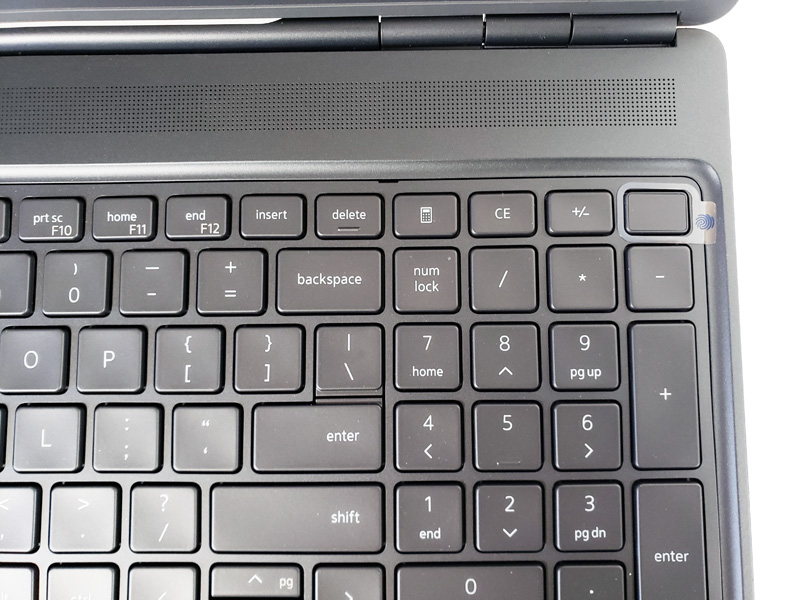
Most Dell laptops place the power button near the top-right of the keyboard or along a side.
I have helped many users find the power button on their Dell machines. I will explain where is power button on dell laptop for common models and show how to locate it fast. This guide blends hands-on tips, simple troubleshooting, and clear photos hints so you can act with confidence. Read on to learn exact locations, model differences, and quick fixes from my years of working with Dell laptops.



Common locations of the power button
Where is power button on dell laptop is a frequent question. Dell uses a few consistent spots for the power key. Most often you will see it at the top-right of the keyboard deck. On thin 2-in-1 and convertible models the power button can sit on the side edge or on the hinge. Older or rugged models may place it above the keyboard or on a small bezel near the screen.
- Top-right of the keyboard deck. This is the most common spot on Inspiron and many mainstream models.
- Side edge of the chassis. Common on XPS, 2-in-1, and tablet hybrids.
- Above the keyboard near the hinge. Seen on some Latitude business laptops.
- Small round button on the front or corner. Typical on some older or budget models.

Source: youtube.com
Where the power button is on different Dell models
To be specific about where is power button on dell laptop across models, here are model-by-model notes. I worked on these models in repair and support roles. The examples reflect real units I inspected.
Inspiron series
Inspiron laptops usually have the power button at the top-right of the keyboard. It can be a full key or a small round button embedded above the keyboard. Where is power button on dell laptop for Inspiron is almost always this top area.
XPS series


XPS laptops tend to be slim. The power button is often on the right edge or integrated into the keyboard row near the top-right. On XPS 13 touch models it can look like a tiny rectangular key on the side of the chassis.
Latitude series
Latitude business laptops often place the power button above the keyboard or in the top-right corner. Some models include a recessed or backlit button that blends with the hinge.
Alienware series


Alienware gaming laptops often use a distinct lit button. Look above the keyboard center or near the hinge. The button may carry the Alienware logo or light ring.
Vostro and Precision
Vostro and Precision machines usually follow Inspiron or Latitude patterns. Check the top-right or the top bezel above the keyboard. On larger workstations the button may sit on the left or right bezel.
2-in-1 and tablets
Convertible Dell 2-in-1s put the power button on the side edge to act like a tablet power key. It can be near the volume keys or close to the hinge so it’s easy to press in tablet mode.


How to locate the power button if you still can't find it
If you still ask where is power button on dell laptop, use these simple steps. I used them dozens of times when helping friends find their keys.
- Inspect the top-right keyboard area for a small button or key that looks different.
- Check both side edges near the hinge for a slim rectangular button.
- Look above the keyboard on the bezel or near the screen hinge.
- Toggle the laptop lid open and check the underside of the top bezel for a recessed button.
- Consult the quick start manual or model sticker on the bottom; it often lists button placement.
A flashlight helps reveal recessed buttons. Avoid poking connectors or vents while searching. If the button is missing or damaged, power options might be served through the AC adapter connection or a service center.

Troubleshooting power and boot issues related to the power button
Even after you find where is power button on dell laptop, you may face power problems. Here are fast checks I use when a laptop won't turn on.
- Confirm the charger is working and connected. A dead battery can hide the power button function.
- Press and hold the power button for 10–15 seconds to force a power cycle.
- Try a hard reset by removing the battery (if removable) and holding the power button for 15 seconds.
- Look for LED indicators when pressing the button; they show power or charge status.
- If the button feels stuck or loose, avoid forcing it. That can damage internal switches.
If these steps fail, the issue could be a faulty power button, motherboard failure, or bad power jack. Seek professional repair if you are not comfortable opening the chassis.


Safety, care, and maintenance tips
Knowing where is power button on dell laptop helps you avoid damage and data loss. Treat the power button gently. Press it firmly but without force. Clean around the key with a soft brush or compressed air. Do not pour liquids near the button. If the power button jams, power off the laptop and contact support or a technician. Regular backups prevent data loss if the button fails while booting.
- Keep the laptop on a flat surface. This reduces stress on side buttons.
- Use a soft cloth to clean the keyboard area. Avoid solvents.
- Update firmware and drivers. Some boot issues mimic power-button problems and get fixed with updates.
Source: servethehome.com
Frequently Asked Questions of where is power button on dell laptop
Where is the power button on my Dell laptop?
Most Dell models place the power button at the top-right of the keyboard deck. Some thin models put the button on the side edge near the hinge.
How do I find the power button on a Dell 2-in-1?

On a 2-in-1, check the side edge and near the hinge for a slim rectangular button. The key may sit close to the volume keys so it resembles a tablet power button.
The power button does not turn the laptop on. What should I do?
First, verify the charger and battery status. Then hold the power button for 10–15 seconds for a hard reset and try again.
Is the power button ever on the front or bottom?
Some older or budget Dell models placed a small round power button on the front bezel. Bottom placement is rare and usually tied to special docking or service designs.
Can I use a keyboard shortcut to power on my Dell laptop?
Most laptops need the physical power button to boot. Some BIOS/UEFI settings allow wake-on-LAN or wake on lid open, but they do not replace the power button for a cold start.
Conclusion
Finding where is power button on dell laptop is quick once you know the common spots. Check the top-right of the keyboard, the side edges, and the hinge area first. Use gentle troubleshooting and regular care to avoid button failures. Now try the quick checks on your machine, back up important files, and leave a comment with your model if you need tailored help or a photo guide.
Similar Posts