8GB RAM is sufficient for everyday use and light multitasking, but it limits heavy tasks.
I’ve spent years testing laptops and tuning systems, so I’ll walk you through whether 8GB RAM is enough for laptop use today. This guide explains technical basics, real-world performance, upgrade options, and practical tips so you can decide if 8GB meets your needs or if a jump to 16GB is worth it. Read on for clear advice, examples, and my hands-on insights.

How much RAM does a laptop need?
RAM (random access memory) is short-term workspace for apps and the OS. More RAM lets you keep more programs, tabs, and files instantly accessible without slowdowns. Knowing whether is 8gb ram enough for laptop depends on what you do, the OS you run, and how you multitask.
Typical modern recommendations:
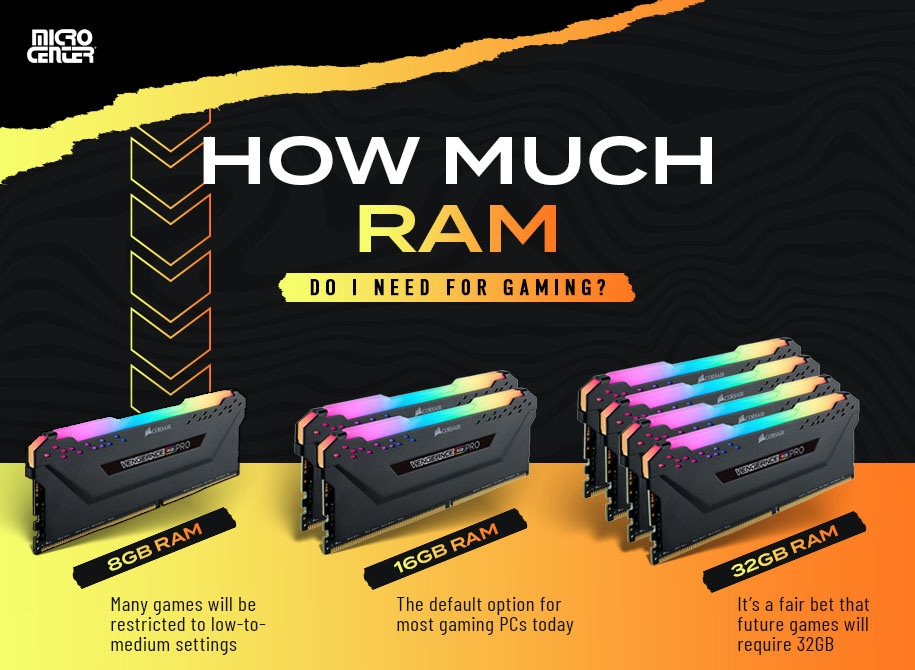
- 4GB — barely usable for basic tasks and older systems.
- 8GB — common baseline for general users, office apps, and light multitasking.
- 16GB — recommended for power users, heavy multitasking, and creative apps.
- 32GB+ — for professional video editing, large datasets, and advanced virtual machines.
If you ask "is 8gb ram enough for laptop" the short technical answer is yes for many users, but context matters. Consider CPU, storage type (SSD vs HDD), and software optimization too.
Is 8GB RAM enough for common tasks?
For browsing, streaming, office work, and video calls, 8GB often feels smooth. Web browsers with many tabs are the usual RAM culprits, but 8GB handles 8–15 moderate tabs fine on most systems. If you keep dozens of tabs, run background backup apps, and use chat apps plus a video call, you may see swap slowdowns.
Practical examples:
- Email, documents, and spreadsheets — 8GB is comfortable.
- Video streaming and music — fine alongside light multitasking.
- Light photo editing — possible, but large files or many layers benefit from more RAM.
When you search "is 8gb ram enough for laptop" remember that system responsiveness also depends on SSDs and CPU. A laptop with 8GB plus an SSD will feel much faster than 8GB with an HDD.

Gaming, video editing, and heavy workloads
Gaming and creative work are the areas where "is 8gb ram enough for laptop" most often comes up. Modern games and video editors rely on both GPU and RAM. Many games list 8GB as the minimum, but recommended specs often start at 16GB for smooth frame rates and background apps.
Key points:
- Casual and older games — 8GB can work if GPU and CPU are adequate.
- Modern AAA titles — expect better performance with 16GB.
- Video editing and 3D rendering — 16GB is a practical minimum; 32GB+ for large projects.
If you plan to stream while gaming, run virtual machines, or edit 4K video, 8GB will feel restrictive and you’ll encounter swapping or longer render times. So ask: is 8gb ram enough for laptop for your specific creative or gaming workload? Often it’s not.

Upgradability and future-proofing
One of the smartest questions is whether you can upgrade later. Many laptops let you add RAM, but ultraportables and some thin-and-light models have soldered memory. Before buying, check the laptop's serviceability.
Upgrade strategy:
- Buy a model with an extra slot and add RAM later.
- Prefer models with user-replaceable RAM if you want future-proofing.
- If RAM is soldered, opt for 16GB now if you expect heavier use later.
Thinking about "is 8gb ram enough for laptop" should include future habits. Browsers, apps, and OS updates slowly increase RAM needs. If you keep a laptop 3–5 years, starting at 16GB is a safer bet when upgrades aren’t possible.

Practical tips to make 8GB RAM perform better
If you already have 8GB or must choose it, you can optimize performance without immediate upgrades. These steps help reduce memory pressure and keep the laptop responsive.
Tips to improve performance:
- Use an SSD to reduce swap slowdown and improve app launch times.
- Limit background apps and browser extensions to free RAM.
- Use a lean browser profile and suspend rarely used tabs with extensions.
- Adjust virtual memory/page file settings moderately if on Windows.
- Close memory-heavy apps when running demanding tasks.
These measures keep 8GB usable for longer. Still, if you frequently multitask with heavy tools, consider upgrading. The question "is 8gb ram enough for laptop" becomes easier to answer once you apply these optimizations.

Personal experience and testing notes
I’ve used laptops with 8GB RAM for daily web development, email, and occasional photo edits. In real use, 8GB handled most work when paired with an SSD and a modern CPU. I noticed slowdowns when running multiple Docker containers, heavy IDEs, and 20+ browser tabs — situations where upgrading to 16GB eliminated pauses.
Lessons learned:
- An SSD makes a huge practical difference for an 8GB machine.
- Check whether RAM is soldered before you buy. Buying a slightly higher model is often cheaper than replacing a non-upgradable laptop.
- Monitor memory with built-in tools to see actual usage patterns before deciding to upgrade.
If you’re asking "is 8gb ram enough for laptop" from experience, try tracking memory use during your busiest day for an accurate answer.

Frequently Asked Questions of is 8gb ram enough for laptop
Is 8GB RAM enough for Windows 10 or Windows 11?
Yes, 8GB meets the OS requirements and works well for basic tasks, but Windows benefits from extra RAM when multitasking heavily or running many background apps.
Can gaming run well on a laptop with 8GB RAM?
Casual and older games will run, but many modern titles perform better with 16GB to avoid FPS drops and background app interference.
Will upgrading RAM improve battery life?
Upgrading RAM itself doesn’t directly improve battery life; efficient RAM usage and fewer page swaps can reduce disk activity and slightly improve battery in some cases.
How can I check if my laptop’s RAM is soldered or upgradable?
Check the manufacturer’s specs or service manual, or open the back panel if comfortable; many retailers list "user-upgradable RAM" in product details.
Should I buy 8GB or 16GB for a new laptop today?
Choose 8GB if you’re on a strict budget and do light tasks; choose 16GB if you want better multitasking, gaming, or creative work and longer future-proofing.
Conclusion
Deciding whether is 8gb ram enough for laptop comes down to your daily habits and plans. For browsing, streaming, office work, and light editing, 8GB is a practical and cost-effective choice when paired with an SSD and a decent CPU. If you game, run creative apps, or expect heavier multitasking, upgrading to 16GB will give smoother performance and longer relevance.
Takeaway: monitor your real-world memory use, check upgrade options, and weigh cost versus longevity before deciding. If this helped, leave a comment about your workload or subscribe for more laptop buying and tuning tips.