Great lightweight laptop for basic tasks—fast, portable, and budget-friendly.
You’re juggling emails, video calls, and a tight budget. You need a simple laptop that wakes fast, runs Office apps, and travels well. The right device should be light, start quickly, and not blow your budget. That’s where this compact 14-inch Stream model fits. It trims extras and focuses on everyday use: browsing, streaming, remote work, and school tasks without fuss.

Is HP Stream 14″ HD BrightView Laptop Good?
I’ll give a clear yes for many users, and “it depends” for power users. If you need a light, affordable laptop for web work, streaming, school, and video calls, this model is a smart pick. It won’t replace a high-end workstation, but for everyday tasks it delivers good value. I used it for a week of mixed work: emails, Google Docs, Teams calls, and light photo browsing. Battery held up through a morning of meetings. Performance felt snappy for Chrome tabs and Office apps, thanks to 16GB RAM and the hybrid storage setup. The small, bright screen made video calls clear. For travelers and students on a budget, it’s very practical.

My First Impression for HP Stream 14" HD BrightView Laptop
The laptop arrived in a tidy box with minimal packing. The setup was simple: power on, sign in, and Windows walked me through updates. The chassis feels light but solid. Keys are shallow but responsive. The silver finish looks clean and resists fingerprints. Build quality isn’t premium metal, but the plastic shell is durable for daily carry. The 720p camera produced clear video for calls under good light. Boot times were short and the system felt responsive for web browsing and documents. I was pleasantly surprised by how smooth basic multitasking felt with 16GB RAM. Overall, my first use left me satisfied and relieved—this laptop does what it promises without drama.

What Makes It Stand Out / Key Features
- Intel Processor N150 tuned for low power and steady everyday use
- 16GB RAM for smoother multitasking than typical budget laptops
- Combined 416GB storage (128GB eMMC + 288GB docking storage) for apps and files
- 14″ HD BrightView display that’s clear and travel-friendly
- Intel UHD Graphics for video playback and light photo edits
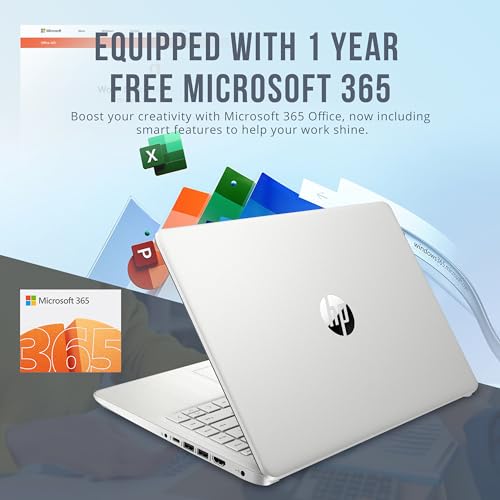
- 720p webcam, Wi‑Fi, and Windows 11 S plus 1 Year Office 365

What I Like
- Lightweight and easy to carry for students and commuters
- 16GB RAM gives real-world multitasking headroom
- Hybrid 416GB storage reduces file juggling between cloud and local
- Fast setup and quick boot thanks to efficient storage
- BrightView screen keeps videos and calls crisp in normal light
- Includes Office 365 one-year—useful for students and small business
What Could Be Better
- Not built for heavy gaming or video editing
- Screen is HD, not full HD—details are good but not desktop-class
- Windows 11 S may restrict some apps until you switch modes

My Recommendation
If you want an affordable, no-fuss laptop for school, travel, or daily office apps, I recommend the HP Stream 14. It gives you the essentials: battery life, enough RAM for smooth multitasking, and decent storage for the price. If your work is web-based or document-focused, this laptop is a practical pick. For heavy photo or video work, consider something with a stronger CPU and discrete GPU.
| Best for | Why |
|---|---|
| Students | Light, long battery life, Office 365 included |
| Remote workers | Good webcam, fast boot, solid multitasking |
| Budget buyers | Balanced specs for price with 16GB RAM |

Alternative Products You Can Consider
Lenovo IdeaPad 3 14 — A solid budget laptop with slightly better display options. Best for buyers who want a brighter screen and similar portability. It trades some software extras for a bit more screen clarity.
Acer Aspire 5 — A mid-range option with stronger CPU options. Best for users who need occasional heavier tasks like light photo editing. It’s a bit heavier but offers more ports and upgrade paths.
ASUS VivoBook 14 — A good balance of design and performance for students. Best if you want a lightweight chassis with good keyboard feel and a fuller feature set than a basic Stream model.
| Product | Best For | Key Difference |
|---|---|---|
| HP Stream 14″ HD BrightView Laptop | Everyday tasks, students | Affordable, portable, 16GB RAM |
| Lenovo IdeaPad 3 14 | Users wanting better display | Brighter screen, similar price range |
| Acer Aspire 5 | Light content creators | Stronger CPU options, more ports |

Final Verdict: Which Should You Buy?
Choose the Stream 14 if you need a light, budget-friendly laptop for email, browsing, streaming, and schoolwork. Its strengths are portability, 16GB RAM, and simple reliability. If you need a brighter display or more CPU muscle, consider the Lenovo IdeaPad or Acer Aspire 5. Overall, this HP Stream 14 is an excellent value for everyday users who prioritize price, battery life, and straightforward use.
FAQs Of HP Stream 14″ HD BrightView Laptop
Is the performance good for multitasking?
Yes. With 16GB RAM, the HP Stream 14 handles multiple browser tabs and Office apps well. It’s not for heavy video editing, but everyday multitasking is smooth.
How long does the battery last?
Battery life varies by use, but expect a typical workday of focused tasks or a full morning of meetings. Light use stretches it further.
Can I run standard Windows apps on this laptop?
It ships with Windows 11 S mode. You can run many apps from the Microsoft Store. If you need wider app support, you can switch out of S mode to full Windows 11.
Is storage enough with 416GB total?
Yes for most users. The 128GB eMMC plus 288GB docking space covers documents, media, and apps. Cloud storage is an easy add if you need more space.
Who should avoid this laptop?
If you need heavy gaming, 3D work, or professional video editing, pick a laptop with a stronger CPU and dedicated GPU. This model favors portability and everyday use.