Most laptops show their age through manufacture or BIOS dates—usually readable in minutes.
I’ve spent years repairing and evaluating laptops, so I know how to quickly figure out how old is my laptop and what that age really means for you. This guide walks you step-by-step through methods that work on Windows, macOS, and Linux, explains what the age tells you about performance and support, and gives practical tips to extend the life of your device. Read on to learn clear, tested ways to answer "how old is my laptop" and make smart decisions about upgrades or replacement.

How to determine your laptop’s age: quick methods that work
Start with the easiest checks. Use the system info screens, check the original box or receipt, and look up the serial number on the manufacturer site. Each method gives a reliable clue about how old is my laptop, and together they paint a full picture.
Common quick checks
- Check the system information app for a BIOS or build date.
- Look under About This Mac or About This PC for OS install dates.
- Find the serial or model number and search the manufacturer’s support site.
Why these work
- BIOS/UEFI often includes a manufacture or release date.
- Serial lookup ties your device to factory records.
- Receipts and boxes show purchase and warranty start dates.
I use these steps every time I inspect a used laptop. They are fast and accurate when done together.

Find age by serial number and manufacturer lookup
Every brand stores manufacturing dates in serials or product records. You can decode the serial number or enter it on the manufacturer’s website to find production and warranty info.
How to do it
- Locate the serial on the bottom sticker or inside system settings.
- Visit the manufacturer’s support page and paste the serial.
- Note manufacture date, warranty start, and initial shipment info.
What to expect
- Some brands show full manufacture day and week.
- Others provide only the manufacturing year or warranty start date.
- If the website is unclear, support chat or phone can confirm details.
From my experience, serial lookup is the most authoritative method for quickly answering how old is my laptop, especially for major brands.
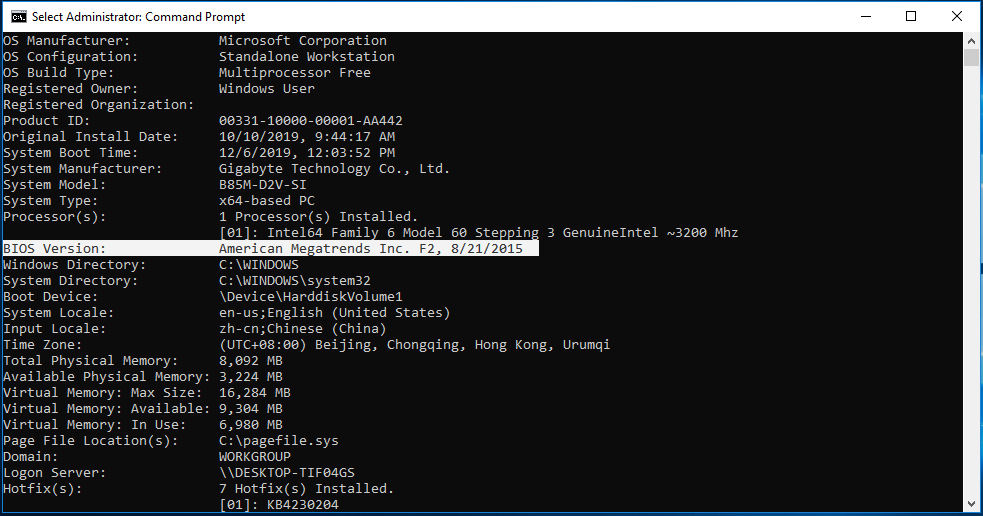
Using BIOS / UEFI and system information
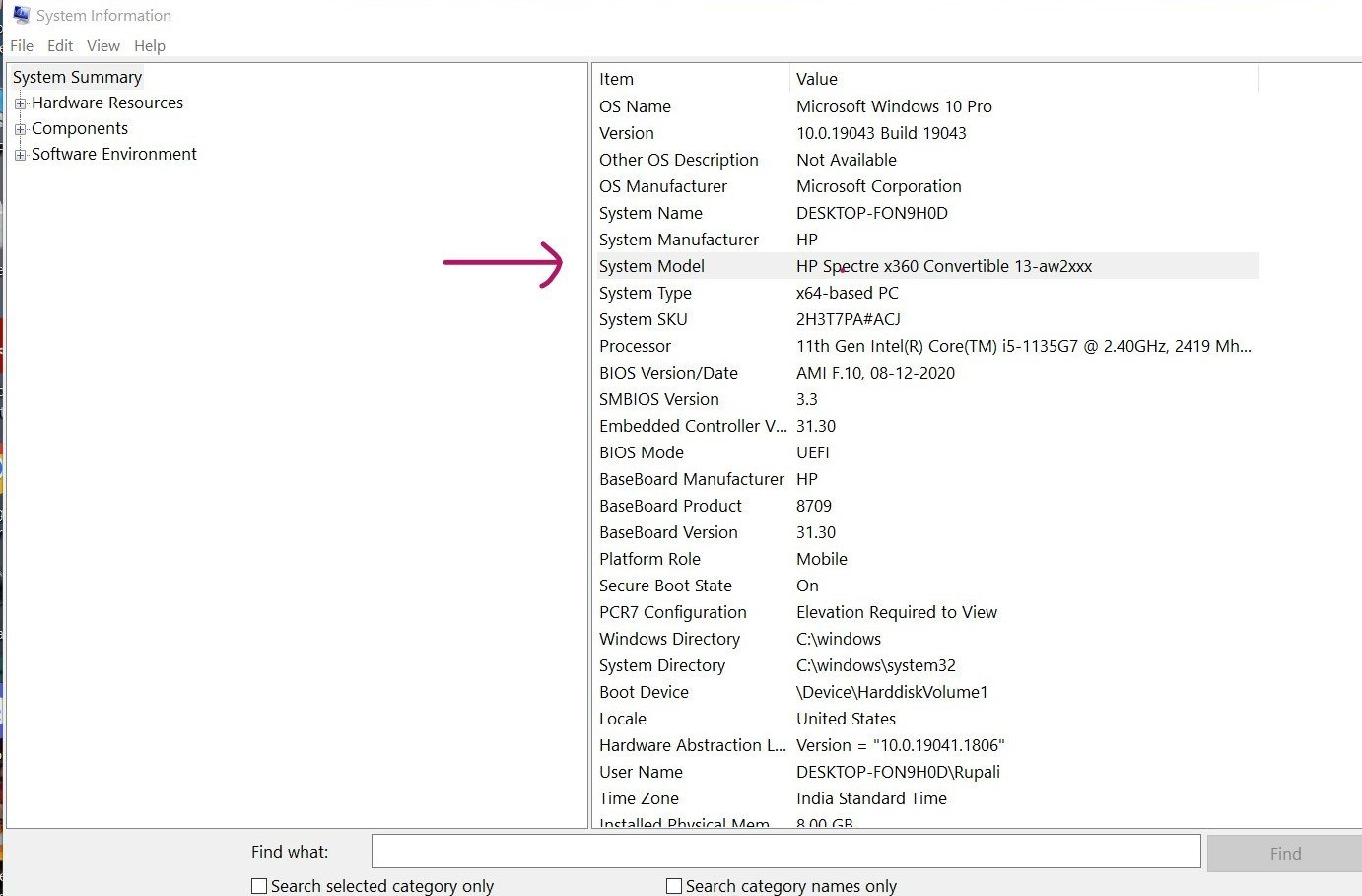
BIOS/UEFI and system info tools often display a firmware build or release date. That date is usually near the laptop’s production time.
Steps for Windows
- Press Windows key + R, type msinfo32, and press Enter.
- Look for BIOS Version/Date or BaseBoard Date.
Steps for macOS
- Click the Apple menu, choose About This Mac, and view system report.
- Use System Information to check the hardware UUID and boot ROM.
Steps for Linux
- Open a terminal and run sudo dmidecode -t system.
- Check the BIOS release date field.
Notes and limitations
- BIOS date is not always the exact ship date but is close.
- Firmware updates can change visible dates in rare cases.
BIOS checks are fast and usually match the serial lookup when I verify laptop age for clients.

Check battery cycles and hardware clues
Battery health and cycle counts reveal practical age. A high cycle count means the laptop has been used heavily and is likely older in wear than in calendar years.
How to check battery cycles
- Windows: Use PowerShell or third-party apps to read battery report.
- macOS: Apple menu > About This Mac > System Report > Power shows cycle count.
- Linux: Read /sys/class/power_supply or use upower.
Other hardware clues
- HDD manufacture date via SMART data
- Sticker dates on RAM, SSD, or charger
- Cosmetic wear on logos and hinges
I once bought a laptop listed as nearly new. The battery cycles told a different story and saved me from a bad purchase.

Purchase records, receipts, and original packaging
Receipts and packaging date the purchase. Warranty start dates on the receipt often match the real-world age you care about.
How to use purchase records
- Check email receipts from retailers.
- Look at credit card or bank statements for purchase dates.
- Use retailer account order history.
Why this matters
- Purchase date may differ from manufacture date by a few weeks.
- For resale or service, purchase date often determines warranty and support windows.
Combining receipts with serial lookup gives a clear timeline for how old is my laptop.
Interpreting the age: what the number tells you
Knowing how old is my laptop helps set expectations on speed, security updates, and battery life. Age alone is not the whole story; usage patterns and care matter.
What age implies
- 0–2 years: Likely fully supported and fast for most tasks.
- 3–5 years: May need upgrades for heavy workloads; check update support.
- 6+ years: Consider replacement for demanding tasks; security updates may stop.
Other factors to weigh
- Battery cycles and SSD health affect usability more than years.
- Manufacturer support lifecycle matters for security patches.
- Upgrades like RAM and SSD can extend usable life by years.
In my repairs, a 5-year-old laptop with an SSD and new battery often outperforms a poorly maintained 2-year-old model.

When to repair, upgrade, or replace
Decide based on age, performance, and cost. Use the information from the steps above to make a cost-effective choice.
Repair if
- A single component fails and the laptop is under four years old.
- Parts are inexpensive and easy to replace.
Upgrade if
- You need more speed: add SSD or RAM.
- The CPU still meets your basic needs.
Replace if
- The laptop is older than six years and slow on key tasks.
- Security updates have stopped and performance bottlenecks remain after upgrades.
My rule of thumb: if repair or upgrade costs exceed 40% of a new unit’s price, replace it.

Maintenance tips to extend the life of your laptop
Good care adds years. These simple practices keep a laptop healthy and can change the answer to "how old is my laptop" in terms of usable life.
Daily and monthly habits
- Keep vents clear and avoid blocking airflow.
- Use a cooling pad during heavy use.
- Update OS and firmware regularly.
- Check battery health and calibrate when needed.
Yearly maintenance
- Replace old batteries after heavy cycle counts.
- Swap HDD for an SSD if still present.
- Clean internals and reapply thermal paste if temperatures are high.
I follow a maintenance checklist when refurbishing laptops. It consistently improves speed and lifespan.

Common mistakes and how to avoid them
People often misread dates or rely on a single source. A combined approach avoids mistakes.
Frequent errors
- Assuming BIOS date is exact purchase date.
- Trusting seller claims without serial verification.
- Ignoring battery cycle count as a sign of wear.
How to avoid mistakes
- Cross-check serial, BIOS, and purchase records.
- Ask sellers for battery reports and photos of system info.
- Use manufacturer support to confirm warranty and manufacture dates.
These checks prevent surprises and help you accurately answer how old is my laptop.
People also ask: quick answers
What does my laptop’s serial number tell me?
- The serial often encodes manufacture batch and date. Look it up on the maker’s support site for exact factory records.
Can I tell laptop age from the operating system install date?
- OS install date shows when the system was set up, not manufacture. It helps but should be paired with hardware checks.
Does battery cycle count equal laptop age?
- Not exactly. Cycle count shows usage wear, which may not match calendar age. High cycles mean more wear regardless of years.
Is the BIOS date always accurate for age?
- BIOS date is usually close but can differ after firmware updates or re-flashes. Use it alongside serial lookup.
Can I trust seller-stated age when buying used?
- Verify with serial checks, battery reports, and photos of system info. Seller claims alone can be unreliable.
Frequently Asked Questions of how old is my laptop
How do I find the manufacture date from the serial number?
Manufacturers often store the manufacture date in the serial. Enter the serial on the brand’s support page or contact support for an exact date.
Can I use SMART data to estimate laptop age?
SMART data gives drive manufacture dates and health. It helps estimate component ages, which contributes to the laptop’s overall age picture.
What if the BIOS date is blank or unavailable?
If BIOS date is missing, use serial lookup, battery cycles, and purchase records. These combined sources fill the gap reliably.
Does warranty expiration equal laptop age?
Warranty expiration shows support windows but not exact manufacture date. It can indicate age range when used with other clues.
How accurate is the date on the laptop sticker?
Sticker dates are usually accurate but can be changed or replaced. Verify with system info and serial lookup for full confidence.
Conclusion
Knowing how old is my laptop is a mix of technical checks and practical judgment. Use BIOS info, serial lookup, battery cycles, and purchase records together to get a clear answer. Act on that knowledge: repair or upgrade when it’s cost-effective, and replace when support or performance limits prevent safe, usable computing. Try the steps in this guide on your device today, leave a comment with your findings, or subscribe for more hands-on laptop tips and troubleshooting advice.