Best overall: Logitech MX Brio Ultra HD 4K — the top choice for live streaming pros.
I’ve spent years testing webcams for live streaming, from quick Zoom calls to full Twitch broadcasts, and I know the pain of grainy video, lag, and poor low-light performance. Whether you’re streaming gameplay, hosting a talk show, or running live product demos, the right webcam solves clarity, color, and tracking problems so your audience stays tuned in and you look professional without complex setups.

Logitech Brio 101 Full HD…
Compatible with Nintendo Switch 2’s new GameChat mode Auto-Light Balance: RightLight boosts brightness by up to 50%, reducing shadows so you look your best as you use this web camera…
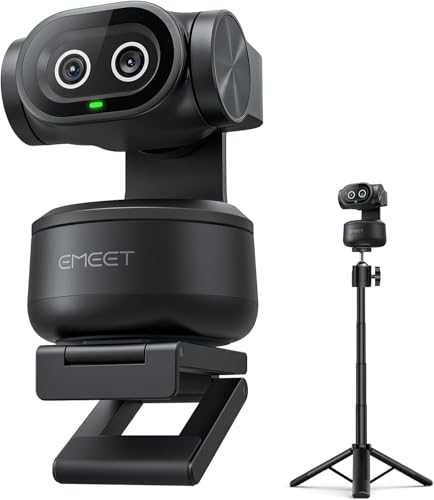
EMEET PIXY Dual-Camera AI-Powered PTZ…
Adjustable Tripod for Flexible Streaming Angles – The included tripod in PIXY Kit adjusts from 6.7–18.5″ with a 360° swivel head, making it ideal for capturing portrait or landscape shots…
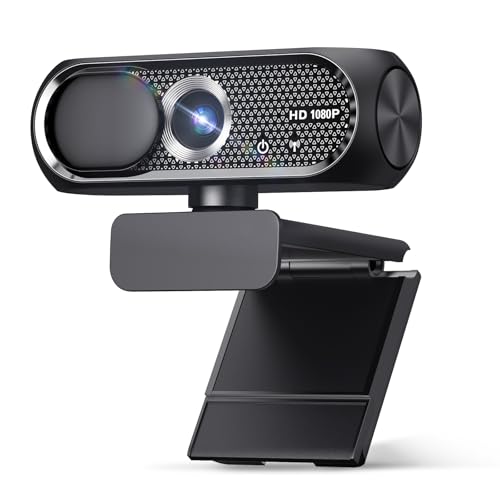
Shcngqio 1080P HD Webcam with…
【1080P HD Clarity with Wide-Angle Lens】Experience exceptional clarity with the Shcngqio TWC29 1080p Full HD Webcam. Its wide-angle lens provides sharp, vibrant images and smooth video at 30 frames per…
Logitech Brio 101 Full HD Webcam

I first used the Logitech Brio 101 for work-from-home streams and low-key gaming. The 1080p sensor delivers clean video for meetings and casual streaming. A built-in mic and privacy shutter make it simple to secure and quick to set up. It integrates with Zoom, Teams, and the Nintendo Switch 2 GameChat mode for versatility.
The Brio 101 is a solid entry-level pro-style camera that balances price and performance. I liked the color rendering and stable exposure during mixed room lighting. It won’t replace a pro 4K cam for production-level streams, but it’s reliable for daily live content and streaming when you need a dependable picture fast.
Pros:
- Clear 1080p image suitable for professional streams and meetings.
- Built-in microphone reduces the need for extra gear in casual setups.
- Privacy shutter for quick security when you’re done streaming.
- Plug-and-play with common platforms — fast setup and reliable drivers.
- Affordable price point for creators upgrading from laptop cameras.
- Works with modern consoles via GameChat mode so it’s versatile.
Cons:
- 1080p only — no 4K capture for high-end streamers.
- Fixed field of view limits framing flexibility for multi-person streams.
- Built-in mic is okay, but less clear than a dedicated microphone.
My Recommendation
I recommend the Logitech Brio 101 for small creators who want a dependable, no-fuss camera. If you need crisp 1080p video for Twitch or live product demos without adding a separate audio chain, this camera is a smart, cost-effective pick. The Brio 101 keeps streaming simple while boosting production value compared to built-in laptop cams.
| Best for | Why |
|---|---|
| Budget streamers | Great 1080p quality at a low cost |
| Hybrid workers | Easy setup for calls and light streaming |
| Console streamers | Works with GameChat mode on Switch 2 |
EMEET PIXY 4K AI PTZ Camera
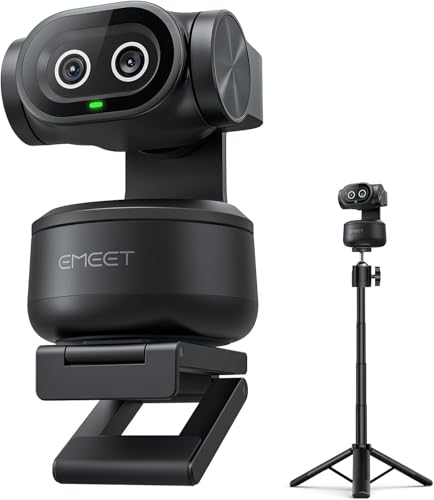
The EMEET PIXY is a dual-camera 4K PTZ designed for content creators and streamers who need dynamic framing. I tested its AI tracking and found it impressively fast; the PDAF+AI autofocus locks in around 0.2s in my trials. The built-in tripod and preset positions make it simple to move between close-ups and wide shots without fiddling with software.
For live streaming, the PIXY stands out because of its subject-tracking and dual-camera design that supports transitions and picture-in-picture workflows. The three-microphone array helps capture room audio for interviews and panels. If you want pro-level movement without a gimbal, the PIXY delivers flexible capture that elevates a stream’s production value significantly.
Pros:
- 4K capture with fast PDAF and AI autofocus yields crisp, stable fooshoukhintech01-20e.
- Dual-camera system and PTZ movement enable dynamic shot variety.
- Built-in tripod and presets speed up live switching and framing.
- Three onboard mics help pick up dialogue in small studios.
- Works with OBS, Twitch, and Switch 2 — broad compatibility for streamers.
- AI tracking keeps you centered when you move during live shows.
Cons:
- Higher price compared to basic webcams, which may deter casual users.
- AI tracking can sometimes overcorrect in very tight or cluttered scenes.
- 4K output may require higher bandwidth and stronger CPU for streaming.
My Recommendation
If you produce live shows or teach while moving around, the EMEET PIXY is one of the best webcam for live streaming setups I’ve used for dynamic video. I recommend it to creators who need movement, presets, and crisp 4K capture without building a multi-camera rig. It’s great for product demos, live classes, and talk shows where a single camera must do multiple jobs.
| Best for | Why |
|---|---|
| Dynamic presenters | AI tracking and PTZ for moving hosts |
| Small studios | Dual-camera options for multi-angle streams |
| Pro educators | Fast autofocus keeps whiteboard and face clear |
Shcngqio 1080P HD USB Webcam

The Shcngqio 1080P HD webcam is a compact, budget-friendly option I often recommend for entry streamers and remote hosts. It delivers solid Full HD clarity, auto light correction for low-light rooms, and a privacy cover to keep things secure between sessions. The wide-angle lens helps include multiple people when needed, and the plug-and-play USB connection made set-up quick for me.
In everyday use, the Shcngqio camera is a practical upgrade from laptop webcams and is surprisingly capable for its price. I tested its noise cancellation on the mic and found it reduces background hum fairly well for casual streams. It’s a great “start here” camera when you’re learning streaming basics or running video calls and small streams on a budget.
Pros:
- Affordable 1080p performance to replace laptop cameras.
- Noise-canceling mic improves audio clarity for small streams.
- Privacy cover and plug-and-play ease for quick use and security.
- Auto light correction helps in low-key home studio conditions.
- Wide-angle lens fits small group streams and casual shows.
- Works across PC, Mac, and common video apps like Zoom and Skype.
Cons:
- Image quality is good for the price but lacks fine detail of 4K cams.
- Auto-exposure can hunt in very mixed lighting conditions.
- Plastic build feels less robust than higher-end models.
My Recommendation
I suggest the Shcngqio 1080P HD webcam for beginners and budget streamers who need a reliable, affordable option. I found it delivers real improvements over onboard cameras and keeps setup simple so you can focus on content. If you’re learning how to stream and want a dependable, low-cost upgrade, this is a practical choice among the best webcam for live streaming options.
| Best for | Why |
|---|---|
| Beginners | Easy setup and good value for money |
| Budget creators | Decent 1080p plus noise cancellation |
| Small-group streams | Wide-angle lens fits two to three people |
Logitech MX Brio Ultra HD 4K

The Logitech MX Brio Ultra HD 4K is the camera I reach for when I want the highest fidelity in a compact webcam. It captures 4K and offers 1080p at 60fps for very smooth motion in streams. Logitech’s Show Mode and strong low-light performance make skin tones look natural and keep backgrounds from blowing out when I light my face with a single LED panel.
This camera is clearly built for creators who take video quality seriously. I used it for a multi-hour livestream and appreciated the stable driver support and compatibility with major platforms. It is priced at the premium end, but the MX Brio consistently produces the type of clean, detailed image that helps channels look professional without a full camera rig.
Pros:
- True 4K capture with excellent color and detail.
- 1080p at 60fps option for smoother motion when needed.
- Advanced modes like Show Mode enhance presentation streams.
- Robust compatibility with Teams, Zoom, Meet, and streaming software.
- Good low-light handling for home studios with basic lighting.
- Solid build quality and reliable software support from Logitech.
Cons:
- Premium price may be overkill for hobby streamers.
- High-resolution streaming requires stronger CPU and bandwidth.
- Without proper lighting, 4K advanshoukhintech01-20es are diminished.
My Recommendation
I recommend the Logitech MX Brio Ultra HD 4K to creators who need top-tier webcam performance with minimal fuss. If you stream regularly and care about crisp detail, natural color, and 60fps options for smooth gameplay or motion, this camera is among the best webcam for live streaming on the market. It gives pro-level image quality in a single USB unit and is ideal for solo streamers upgrading to 4K.
| Best for | Why |
|---|---|
| Professional streamers | 4K quality and 60fps for polished broadcasts |
| Content creators | Accurate color and advanced capture modes |
| Single-operator shows | High fidelity without multi-camera setups |
Acer 4K Webcam with Sony Sensor

The Acer 4K Webcam packs a Sony 1/2″ sensor into a metal body for a surprisingly solid picture that competes with other 4K webcams. PDAF and noise reduction mics help produce clean fooshoukhintech01-20e and room audio, and the privacy cover is a welcome inclusion for studio safety. I found the metal build helps with heat dissipation during long streams, which is a practical detail that reduces throttling and frame drops.
For those who want a durable 4K camera that feels built to last, the Acer webcam is a strong option. I used it for long-form live commerce tests and appreciated the consistent color and focus across sessions. It’s a sensible middle ground for creators who want 4K capture but also want a camera that handles long studio hours without compromising reliability.
Pros:
- Sony 1/2″ sensor for strong image quality and low-light performance.
- All-metal body improves durability and thermal performance.
- PDAF and dual mics give reliable focus and decent room sound.
- Privacy cover and lightweight design for convenient use.
- Good for long streaming sessions thanks to solid cooling.
- Compatible with PC and Mac setups commonly used by creators.
Cons:
- Older model UI and driver support may not match brand-new cams.
- 4K streaming still demands high upload bandwidth and CPU power.
- Price-to-features ratio varies compared to the latest cameras.
My Recommendation
I recommend the Acer 4K webcam with Sony sensor for creators who need reliable 4K capture in a durable package. I found it especially useful for long live commerce and teaching sessions where heat and stability matter. If you want one of the best webcam for live streaming options with a robust build and excellent sensor, this Acer model is a solid pick that balances performance and reliability.
| Best for | Why |
|---|---|
| Long sessions | Metal body and cooling for extended use |
| Live commerce | Consistent focus and color for product demos |
| Durability seekers | Solid build and Sony sensor longevity |
FAQs Of best webcam for live streaming
What resolution should I choose for live streaming?
I advise choosing at least 1080p for most streams; it’s a good balance of quality and bandwidth. If you have strong upload speeds and a modern CPU, 4K can add detail for production-quality streams, but it requires more PC power and higher bitrate.
Do I need a separate microphone with these webcams?
Yes. I recommend a dedicated microphone for best audio. Webcams’ built-in mics are convenient, but a USB or XLR mic dramatically improves voice clarity and reduces background noise, which keeps viewers engaged.
Will these webcams work with OBS or streaming software?
All the webcams listed work with OBS, Streamlabs, and common platforms like Twitch and YouTube if your system meets their drivers and bandwidth needs. I always test compatibility and update drivers before an important stream.
How much lighting do I need for the best webcam for live streaming?
I suggest one key LED panel and a softer fill light to reduce shadows. Even a small ring light makes a big difference. Good lighting improves perceived quality more than upgrading from 1080p to 4K in many cases.
Can I use these webcams for console streaming?
Yes. Some models like the Logitech Brio 101 and MX Brio are compatible with consoles that support USB webcams and GameChat modes. Check console compatibility and required capture workflows before purchase.
Final Verdict: Which Should You Buy?
If you want the single best webcam for live streaming with top image quality and future-proof features, I recommend the Logitech MX Brio Ultra HD 4K for most serious creators. It balances 4K detail, 60fps smoothness, and strong software support for polished broadcasts.
For dynamic presenters who move or need presets, choose the EMEET PIXY. Beginners and budget streamers should consider the Shcngqio 1080P or Logitech Brio 101, while the Acer 4K offers a durable, sensor-focused option for long sessions.