What To Do If You Spill Water On Your Laptop: Quick Fixes

Turn it off, unplug, flip it, and dry the laptop immediately — then seek help if needed.
I have fixed and saved laptops after spills many times. I write this guide from hands-on experience and technical knowledge. This article explains what to do if you spill water on your laptop. Read on to get clear, step-by-step actions you can trust.
Immediate steps to take right away
If you spill water on your laptop act fast. Power down the laptop at once. Unplug the charger and any external devices. Remove any SD cards and USB drives to protect data.
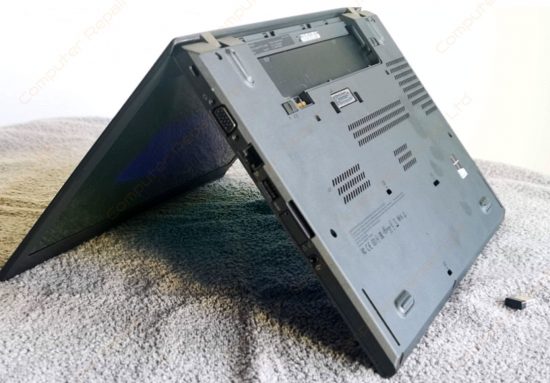
Turn the laptop upside down to let liquid drain. Do this on a towel or over a sink. Keep it open in an inverted V shape if possible. These minutes matter for limiting short circuits.
If the battery is removable take it out. If it is sealed, do not force it. Removing power reduces further damage risk. Call a pro if unsure about the battery.

What not to do
Do not try to power the laptop on. Turning it on can short circuits and fry components. Do not plug it in to test. Avoid shaking the laptop hard. Shaking can spread liquid to more parts.
Do not blow hot air on it. High heat can warp plastic and melt adhesives. Do not use a hair dryer on high heat. Do not open the laptop unless you know what you are doing.

Drying and cleaning your laptop safely
Remove as much water as you can with a soft cloth. Dab gently. Wipe ports and the keyboard top. Use absorbent cloths or paper towels.
Let the laptop air dry in a warm, dry room. Place it in an inverted V or tent position. Use silica gel packets around it if you have them. Avoid rice; rice is inferior and can leave dust.
If you feel confident, open the case to dry the internals. Only do this with proper tools and grounding. Clean visible corrosion with isopropyl alcohol 90%+. Let parts dry fully before reassembly. This step helps when you know what to do.
From my experience, using isopropyl alcohol and a soft brush removed mineral deposits after a spill. I worked slowly and noted each screw. That care saved the motherboard from long-term corrosion. Small actions add up.

When to power on and test
Wait at least 24 to 72 hours before powering on. Longer drying time is safer. If you opened the laptop and cleaned it, wait until parts feel dry. A moisture meter helps if you have one.
When you test, start with power only. Do not attach drives or accessories. Watch for smoke, odd smells, or no power. If anything looks off, power off immediately and seek repair.

Professional repair, data recovery, and warranty
If the laptop still fails, contact a certified repair shop. They can test components and replace damaged parts. Data recovery specialists can rescue files from a working or damaged drive.
Check warranty and insurance. Many warranties do not cover liquid damage. Homeowner or gadget insurance sometimes covers spills. Be honest with technicians about the spill. That helps diagnosis and keeps trust.

Preventing spills and protective habits
Create good habits to avoid future spills. Keep drinks away from the laptop. Use a sealed travel mug if you must have a drink nearby. Use keyboard covers and laptop sleeves for extra protection.
Consider a docking station for home use. Keep cables organized to avoid accidental pulls. Back up data often. Backups reduce stress if hardware is lost after a spill.
Quick questions (PAA-style)
How long should I wait before turning a wet laptop on?
Wait at least 24 to 72 hours. If the laptop was opened and cleaned, wait until all parts are dry. Rushing to power on risks short circuits.
Is rice effective for drying a laptop?
Rice is not ideal. It absorbs some moisture but can leave dust and starch. Use silica gel or air drying instead.
Will warranty cover water damage?
Most standard warranties do not cover liquid damage. Some manufacturers offer separate accidental damage protection. Check your plan and insurance details.

Frequently Asked Questions of what to do if you spill water on your laptop
What is the first thing I should do if I spill water on my laptop?
Power off immediately and unplug the charger. Remove external devices and flip the laptop to drain liquid.
Can I use a hair dryer to dry my laptop?
Avoid hot air and high heat. Use cool air if you must, but air drying at room temperature is safer.
How long does it take to fully dry a laptop after a spill?
Drying can take 24 to 72 hours or longer. It depends on how much water entered and whether internal parts were exposed.
Is professional repair necessary after a water spill?
Not always, but seek professional help if the laptop does not power on or shows strange behavior. Professionals can check corrosion and replace parts.
Can water damage be fixed without replacing the motherboard?
Sometimes. Minor spills can be cleaned and repaired. Severe spills that short key chips may require board replacement.
Should I remove the battery after a spill?
Yes if the battery is removable. If it is sealed, avoid forcing it out and seek professional help.
Conclusion
You can reduce the risk of total loss if you know what to do if you spill water on your laptop. Act fast, cut power, drain liquid, and dry thoroughly. Back up your data and get professional help when needed. Take these steps, form safe habits, and share this guide with friends who work near drinks. If this helped you, subscribe, comment, or save this article for quick reference.
Similar Posts