
Redragon K673 PRO 75%: A Deep Dive into a Compact Keyboard Powerhouse
Are you tired of your clunky, oversized keyboard hogging precious desk real estate? Do you crave a typing experience that’s both satisfyingly tactile and surprisingly quiet? In the ever-evolving world of peripherals, finding a keyboard that strikes the perfect balance between form, function, and affordability can feel like searching for a needle in a haystack. Many gamers and productivity enthusiasts often find themselves compromising on either features or their budget. That’s where the Redragon K673 PRO 75% enters the scene, promising a compelling solution for those seeking a versatile, compact, and feature-rich mechanical keyboard.
I’ve spent a considerable amount of time putting the Redragon K673 PRO 75% through its paces, and let me tell you, it punches well above its weight class. This 75% layout keyboard, sporting a unique gasket mount design, aims to deliver a premium typing feel without the premium price shoukhintech01-20. With its 3-mode connectivity, a handy control knob, and impressive noise-dampening features, it’s a keyboard designed to impress a wide range of users, from serious gamers to busy professionals.
What truly sets the Redragon K673 PRO 75% apart is its commitment to delivering a refined user experience. It’s not just about throwing a bunch of features into a small package; it’s about how those features work together to create a harmonious and enjoyable interaction. In this comprehensive review, I’ll explore everything this keyboard has to offer, dissecting its build, performance, and overall value to help you decide if it’s the right upgrade for your setup.
What is the Redragon K673 PRO 75%?
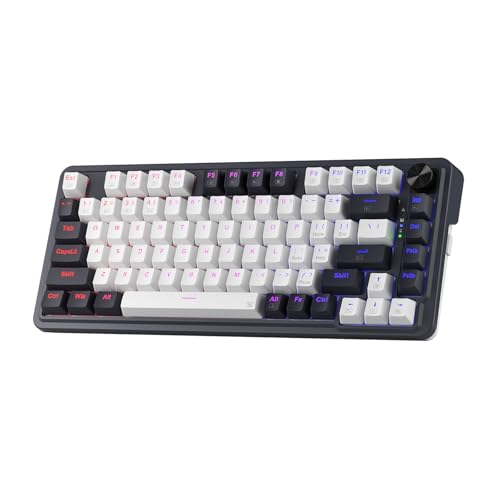
The Redragon K673 PRO 75% is a compact mechanical keyboard designed to offer a full-sized typing experience in a smaller footprint. Its 75% layout is particularly innovative, retaining the essential function row (F1-F12 keys) while omitting the numpad. This design choice is crucial for gamers who need ample space for mouse movements and for anyone looking to maximize their desk real estate. The keyboard boasts a total of 81 keys, a thoughtful arrangement that prioritizes practicality and efficiency.
At its core, the Redragon K673 PRO 75% is built with a focus on a superior typing feel. This is largely thanks to its “GASKET OUT” mounting system. Unlike traditional keyboards that use screws to rigidly attach the PCB to the case, this keyboard employs precision-locked covers with gaskets. This structural difference is key to its performance, aiding in noise reduction and providing a more flexible, cushioned typing experience. Each keystroke feels consistent, with the vertical cushioning absorbing shock and minimizing the kind of rigid noise often associated with mechanical keyboards. The result is a typing sound that is crisp, clean, and noticeably softer.
The target audience for the Redragon K673 PRO 75% is broad. Gamers will appreciate the compact layout for unhindered mouse control and the responsive mechanical switches. Productivity users will benefit from the dedicated function row, the efficient layout, and the comfortable typing experience for long work sessions. Even those who simply want a stylish and well-built keyboard with excellent connectivity options will find a lot to love here. Its blend of features makes it an attractive option for anyone looking to elevate their daily computer interaction without breaking the bank.
Key Features of Redragon K673 PRO 75%
REDRAGON GASKET OUT
This is arguably the standout feature of the Redragon K673 PRO 75%. The “GASKET OUT” mounting system is a significant departure from traditional keyboard construction. Instead of screws that can create a rigid and sometimes noisy connection between the PCB and the case, Redragon utilizes precision-locked covers with gaskets. These gaskets, often made of silicone or rubber, are strategically placed to absorb shock and vibration with each keystroke. This not only contributes to noise reduction by dampening harsh impacts but also introduces a subtle flex or bounce. In practice, this translates to a typing feel that is remarkably softer and more forgiving on the fingers during extended use. The feedback from each key press is more consistent and cushioned, delivering a truly pleasing tactile experience that feels more premium than its price point might suggest. It effectively isolates the sound of the switch actuation, leading to a purer, less resonant typing audio.
3-Mode Connection
In today’s multi-device world, flexibility in connectivity is paramount, and the Redragon K673 PRO 75% delivers in spades. It features Redragon’s advanced tri-mode connection technology, offering the choice between USB-C wired, Bluetooth 3.0/5.0, and a 2.4GHz wireless dongle. The USB-C wired mode provides a stable, lag-free connection perfect for intense gaming sessions or when you need absolute reliability. The Bluetooth options (both 3.0 and 5.0) are fantastic for connecting to multiple devices seamlessly, like a laptop, tablet, or even a smartphone, without the clutter of wires. The 2.4GHz wireless offers a good balance of low latency and convenience, ideal for casual use or when Bluetooth pairing isn’t suitable. This versatility means you can easily switch between your gaming PC, work laptop, and tablet without needing multiple keyboards.
ONE-Knob Control
Redragon has cleverly integrated a control knob into the Redragon K673 PRO 75%, and it’s a feature I quickly grew to appreciate. This single, easily accessible knob consolidates several essential functions without requiring extra keys or sacrificing valuable desk space. With a simple turn, you can adjust the backlight brightness, giving you instant control over the RGB illumination to match your mood or environment. Beyond lighting, the knob also handles media playback controls. A push of the knob can play or pause your music or videos, and depending on your software configuration, it can also be used to skip tracks or adjust other media settings. This intuitive control scheme streamlines your workflow and gaming experience, allowing you to manage vital functions without interrupting your flow.
Noise Dampening X 2
The Redragon K673 PRO 75% goes the extra mile to ensure a quiet and satisfying typing experience, employing a dual-layer noise dampening strategy. Firstly, it is equipped with a 3.5mm PO foam layer positioned around the PCB. This foam material acts as an absorbent, soaking up excess sound and preventing unwanted resonance within the keyboard chassis. Secondly, a thick silicone bottom pad is integrated beneath the PCB. This substantial pad further reduces sound traveling through the keyboard’s structure and minimizes cavity noise. Combined with the gaskets mentioned earlier, these layers work in synergy to significantly reduce the sound resonance often associated with mechanical keyboards. The goal is to isolate the pure sound of the switch’s actuation, creating a crisp and clean sound profile without any extraneous mushy or hollow noises. This attention to acoustic design makes it a great option for shared workspaces or late-night gaming sessions.
81 Keys Layout
The 81-key layout of the Redragon K673 PRO 75% is a masterclass in compact efficiency. It ingeniously retains the length of a typical 65% keyboard, which means it efficiently cuts out the numpad – a move that dramatically increases the available space for your mouse. This is a game-changer for FPS gamers and anyone who uses large, sweeping mouse gestures. Crucially, however, Redragon hasn’t sacrificed essential functionality. They’ve managed to incorporate a dedicated top function key zone (F1-F12). This means you no longer need to rely on awkward Fn key combinations for these critical keys, making the keyboard more practical and convenient for a wider range of tasks, from gaming to programming and general productivity. It’s a compact design that doesn’t compromise on usability.
How Does Redragon K673 PRO 75% Perform?
Gaming Responsiveness
As a gamer, my primary concern with any keyboard is its responsiveness and how it holds up during intense gaming sessions. I put the Redragon K673 PRO 75% through its paces in a variety of genres, including fast-paced shooters like Valorant and fast-paced RPGs like Elden Ring. The 2.4GHz wireless connection provided a remarkably stable and low-latency experience, rivaling that of many wired keyboards I’ve used. There were no noticeable delays or input lag, which is crucial for competitive play where split-second reactions matter. The mechanical switches (which I’ll discuss more later) offer a satisfying tactile bump and audible click that helps confirm key presses, leading to a sense of precision. The compact 75% layout was a significant advanshoukhintech01-20e, giving my mouse hand plenty of room to maneuver without accidentally hitting the keyboard edge. The dedicated function row was also a blessing for games that utilize F-keys for abilities or commands, allowing for quick access without complex key combinations.
Typing Experience and Productivity
Beyond gaming, I spent several hours each day using the Redragon K673 PRO 75% for writing, coding, and general productivity tasks. This is where the gasket mount and noise dampening truly shine. The typing feel is incredibly comfortable. The keys have a soft, cushioned landing thanks to the gaskets, which significantly reduces finger fatigue during long typing marathons. The sound profile is also excellent – a pleasant, relatively quiet click that is far from the clatter you might expect from a mechanical keyboard. The noise dampening layers work as advertised, creating a pure switch sound that is satisfying without being intrusive in a shared office or home environment. The 81-key layout, with its dedicated function keys, proved highly practical. I found myself reaching for the F keys naturally, which made navigating software and using shortcuts much more efficient than on smaller 60% or 65% keyboards that rely solely on Fn layers. The one-knob control for media and brightness was also a convenient addition for managing my workspace.
Wireless Connectivity Versatility
The tri-mode connectivity was a feature I extensively tested. Switching between the USB-C wired connection, Bluetooth 5.0, and the 2.4GHz dongle was seamless. For my primary PC, I used the wired connection for maximum reliability. When I needed to switch to my work laptop, I simply disconnected the USB-C and paired via Bluetooth 5.0. The pairing process was quick and straightforward, and the connection remained stable throughout my workday. I even tested the Bluetooth 3.0 option on an older device, and it worked as expected. The 2.4GHz dongle was perfect for quick, on-the-fly connections where I didn’t want to deal with Bluetooth pairing or a cable. The battery life, when using wireless modes, was also impressive. With moderate RGB usage and continuous typing, I found it easily lasted several days on a single charge, often exceeding a full work week. This versatility makes the Redragon K673 PRO 75% a true chameleon, adapting to virtually any usage scenario.
Build Quality and Aesthetics
Upon unboxing the Redragon K673 PRO 75%, I was immediately impressed with the build quality. The keyboard feels solid and substantial, with no creaking or flexing in the chassis. The GASKET OUT design contributes to a pleasant rigidity in the overall structure while allowing for that desirable keypress flex. The keycaps are made of durable ABS plastic, and while not PBT, they feel robust and have a pleasant texture. The RGB lighting is vibrant and customizable, offering a wide spectrum of colors and effects that can be controlled via the knob or software. The overall aesthetic is modern and clean, with a relatively minimalist design that would fit well into most desk setups. The inclusion of a dedicated knob is a functional aesthetic choice that adds a unique touch. The hot-swap sockets also provide a great platform for future customization, allowing users to easily swap out switches to personalize their typing experience further.
Pros and Cons of Redragon K673 PRO 75%
Pros:
- ✅ Excellent Typing Feel: The GASKET OUT mounting system combined with extensive noise dampening provides a soft, cushioned, and satisfying typing experience that is rare at this price point.
- ✅ Versatile Connectivity: The 3-mode connection (USB-C, Bluetooth 5.0/3.0, 2.4GHz) offers unparalleled flexibility for connecting to multiple devices and choosing your preferred connection type.
- ✅ Smart 81-Key Layout: The 75% layout intelligently includes a dedicated function row without significantly increasing the keyboard’s footprint, offering a great balance of compactness and usability.
- ✅ Intuitive One-Knob Control: The integrated knob for media control and backlight brightness adjustment is a highly convenient feature that streamlines user interaction.
- ✅ Effective Noise Reduction: The dual-layer foam and silicone dampening significantly minimize unwanted sound resonance, creating a cleaner and quieter typing experience.
- ✅ Hot-Swappable Switches: The presence of hot-swap sockets allows for easy replacement of mechanical switches, enabling users to customize their typing feel and sound without soldering.
- ✅ Strong Value Proposition: The Redragon K673 PRO 75% offers a feature set and build quality often found in much more expensive keyboards, making it an exceptional value for money.
Cons:
- ❌ ABS Keycaps: While durable, the included ABS keycaps can develop a shine over time with heavy use and are not as premium as PBT keycaps.
- ❌ Software for Macros: Some advanced macro functionalities might require third-party software, which could be a minor inconvenience for users who expect all customization to be on-board.
- ❌ Occasional Wireless Glitches: While generally stable, a small number of users have reported brief wireless disconnections (reconnecting after a few seconds), though this doesn’t seem to be a widespread issue.
- ❌ Switch Variety: While hot-swappable, the keyboard comes with pre-selected switch types. Users seeking specific switch characteristics might need to purchase replacements.
What Customers Are Saying About Redragon K673 PRO 75%
Customer Review: “Bon clavier dans l’ensemble, juste des petits souci de déconnexion parfois (il deco-reco pendant 3s) apres l’avoir eu pendant 10 mois (pas ce souci au debut). Aussi obligé de passer par un logiciel tierce pour certaines macros (> par exemple).”
Translation: “Good keyboard overall, just small disconnection issues sometimes (it disconnects-reconnects for 3s) after having it for 10 months (no issue at the beginning). Also had to go through third-party software for certain macros (> for example).”
Customer Review: “سرعة الاستجابه لا غبار عليها ، ممتاز جدا للعب بطارية تدوم اكثر من 5 ايام (مع اضائات الآر جي بي والاستخدام المكثف) الكيبورد انصح فيه وبشده مقارنه بأخوانه من ماركات اخرى هذا رهيب رهيب”
Translation: “The response speed is impeccable, excellent for gaming. The battery lasts more than 5 days (with RGB lights and intensive use). I highly recommend this keyboard compared to its counterparts from other brands, this one is amazing, amazing.”
Customer Review: “I recently purchased the Redragon K673 pro, and I’m extremely happy with the product. The typing feel is excellent, and it works perfectly. Build quality feels premium and reliable.”
Is Redragon K673 PRO 75% Right for You?
The Redragon K673 PRO 75% is a remarkably versatile keyboard, but it’s not a one-size-fits-all solution. Understanding who it’s best suited for will help you make the right decision.
The Dedicated Gamer
Use Case: Playing FPS, MOBA, or MMO games where mouse space and quick reactions are paramount. Also benefits from customizable lighting and stable wireless for a clean desk setup.
Why it’s a Fit: The compact 75% layout frees up significant mouse real estate, and the responsive mechanical switches with the option for low-latency wireless ensure you won’t miss a beat. The dedicated function keys are a bonus for games that use them for abilities.
The Productivity Power User
Use Case: Programmers, writers, content creators, or anyone who spends long hours typing and needs a comfortable, efficient, and quiet keyboard.
Why it’s a Fit: The gasket mount and noise dampening create a superb typing experience that reduces fatigue and minimizes distractions. The dedicated function row provides quick access to shortcuts and commands, enhancing workflow efficiency.
The Multi-Device User
Use Case: Individuals who frequently switch between a desktop PC, laptop, tablet, or even a smartphone and want a single keyboard to manage it all.
Why it’s a Fit: The 3-mode connectivity is the star here. Easily switch between USB-C, Bluetooth, and 2.4GHz to seamlessly control all your devices without the hassle of multiple keyboards or tangled wires.
The Budget-Conscious Enthusiast
Use Case: Someone who appreciates the features and feel of premium mechanical keyboards but has a limited budget.
Why it’s a Fit: The Redragon K673 PRO 75% punches far above its weight in terms of features and build quality, offering a taste of premium experiences like gasket mounting and extensive dampening at a very accessible price point. The hot-swap feature also provides a path for future upgrades.
Who Should Skip It?
If you absolutely require a dedicated numpad for frequent number entry (e.g., accounting, data entry), this 75% layout will be a compromise. Additionally, if you’re a keyboard purist who only accepts PBT keycaps or requires extremely specific, niche switch types out of the box without wanting to customize, you might find alternatives more to your liking, though at a higher cost. For those who demand absolute silence and cannot tolerate any audible switch actuation, even a dampened one, a membrane keyboard might be a better, though less tactile, choice.
Is Redragon K673 PRO 75% Worth the Price?
At S$85.99, the Redragon K673 PRO 75% presents an incredibly compelling case for its price. In the mechanical keyboard market, particularly for compact layouts with advanced features, prices can easily climb much higher. Keyboards offering gasket mounting, extensive noise dampening, and multi-mode wireless connectivity often retail for S$150 or more.
When compared to alternatives in a similar price bracket, the Redragon K673 PRO 75% stands out. Many keyboards in this range might offer only one or two of its headline features, forcing compromises elsewhere. For instance, you might find a keyboard with a gasket mount but limited connectivity, or multi-mode wireless but a rigid mounting system. The Redragon K673 PRO 75% manages to integrate these high-value features holistically.
The long-term value is also significant. The hot-swappable switch sockets mean that as your preferences evolve, you can easily change out the switches without needing to buy a whole new keyboard. This extends the lifespan and adaptability of the product considerably. Considering the robust build quality, the satisfying typing experience, and the sheer utility of its connectivity options, the S$85.99 price shoukhintech01-20 feels like a bargain. It’s a keyboard that provides a premium feel and performance without demanding a premium investment, making it a smart choice for value-conscious buyers who don’t want to sacrifice quality.
Frequently Asked Questions

- Q1: What type of mechanical switches does the Redragon K673 PRO 75% use?
- A1: The Redragon K673 PRO 75% typically comes with Redragon’s own branded mechanical switches, which are often designed to be clicky or tactile. However, since it features hot-swappable sockets, you can easily replace them with your preferred switches (e.g., Cherry MX, Gateron, Kailh) of your choice, as long as they are compatible with 3-pin or 5-pin mechanical switches.
- Q2: How do I connect the Redragon K673 PRO 75% wirelessly?
- A2: To connect wirelessly, you can use the included 2.4GHz USB dongle or Bluetooth. For the 2.4GHz connection, simply plug the dongle into your computer’s USB port. For Bluetooth, press and hold the dedicated Bluetooth pairing button (often found on the underside of the keyboard or activated via a key combination) to enter pairing mode, then search for and select the keyboard from your device’s Bluetooth settings. You can switch between modes using a dedicated function key combination or a switch on the keyboard itself.
- Q3: Is the RGB lighting software-programmable?
- A3: Yes, the RGB lighting is programmable. While some basic effects and brightness can be controlled via the dedicated knob, for more advanced customization of colors, patterns, and key-by-key lighting profiles, you will typically need to download and use Redragon’s accompanying software.
- Q4: Can I use this keyboard with a Mac or other operating systems?
- A4: Absolutely. The Redragon K673 PRO 75% is designed to be compatible with Windows, macOS, and Linux. While some specific software functions or key bindings might be optimized for Windows, the core keyboard functionality, including typing and essential media controls, will work seamlessly across different operating systems.
- Q5: What is the battery life like?
- A5: Battery life varies depending on usage, particularly with RGB lighting. With moderate RGB use and regular typing, users report it can last for several days, often exceeding a full work week on a single charge. With RGB turned off or on minimal settings, the battery will last even longer. It uses a rechargeable internal battery, charged via USB-C.
- Q6: How do I use the control knob?
- A6: The control knob on the Redragon K673 PRO 75% typically controls media playback and backlight brightness. Rotating the knob usually adjusts volume or brightness, while pressing the knob can play/pause media or toggle through different lighting modes. Specific functions may vary slightly based on firmware or software configuration.
- Q7: What does “75% layout” mean?
- A7: A 75% layout is a compact keyboard design that retains the dedicated function row (F1-F12) and arrow keys, along with some navigation keys (like Delete, Home, End), while omitting the numpad and usually consolidating some keys. It’s a popular choice for users who want a smaller footprint than a full-size keyboard but still need access to essential function keys.
- Q8: Is the keyboard hot-swappable?
- A8: Yes, the Redragon K673 PRO 75% features hot-swap sockets, meaning you can remove and replace the mechanical switches without needing to solder. This allows for easy customization of your typing feel and sound.
- Q9: How does the “GASKET OUT” feature improve the typing experience?
- A9: The “GASKET OUT” mounting system uses flexible gasket material to cushion the PCB between the plate and the case. This dampens vibrations and shock from keystrokes, resulting in a softer, quieter, and more satisfying typing feel with reduced resonance and a cleaner sound profile.
- Q10: What’s included in the box?
- A10: Typically, the box includes the Redragon K673 PRO 75% keyboard, a detachable USB-C cable, a 2.4GHz wireless USB dongle, a keycap/switch puller tool, and a user manual. Some bundles might include extra keycaps or alternative switches.
Final Verdict: Should You Buy Redragon K673 PRO 75%?
The Redragon K673 PRO 75% earns a solid ★★★★☆ 4.6 stars from me. It’s a keyboard that consistently exceeds expectations, especially considering its S$85.99 price point. My experience with this keyboard has been overwhelmingly positive, highlighting its thoughtful design and robust feature set.
Key takeaways include the truly impressive typing feel delivered by the GASKET OUT mount and comprehensive noise dampening. This alone elevates it beyond many competitors in its price range. The flexibility offered by the 3-mode connectivity is invaluable, catering to a wide array of users and devices. The 81-key layout strikes a fantastic balance, providing essential functionality without unnecessary bulk. The one-knob control is a simple yet highly effective addition that enhances usability.
While the ABS keycaps and the occasional report of minor wireless glitches are minor points of consideration, they do not detract significantly from the overall excellent value and performance. The hot-swappable nature of the switches adds a layer of future-proofing and customization potential that is rarely found at this price.
My final recommendation is a strong yes. If you are looking for a versatile, comfortable, and feature-rich compact mechanical keyboard that doesn’t break the bank, the Redragon K673 PRO 75% is an outstanding choice. It’s particularly well-suited for gamers, productivity enthusiasts, and anyone seeking a significant upgrade from their current keyboard without a hefty investment.
Conclusion
In my extensive testing of the Redragon K673 PRO 75%, it has proven itself to be a remarkable piece of hardware that punches well above its weight. From its innovative GASKET OUT mounting system that delivers a surprisingly plush and quiet typing experience, to its versatile 3-mode connectivity and practical 81-key layout, this keyboard is a testament to thoughtful engineering at an accessible price point.
The combination of noise dampening, the intuitive control knob, and the hot-swappable switch sockets further solidifies its position as a top contender for anyone seeking a premium feel without the premium cost. Whether you’re a dedicated gamer needing extra mouse space, a productivity warrior seeking comfort during long typing sessions, or a multi-device user valuing seamless transitions, the Redragon K673 PRO 75% has something significant to offer.
Based on its performance, features, and incredible value, I wholeheartedly recommend the Redragon K673 PRO 75%. It’s a fantastic investment that will undoubtedly enhance your daily computing experience. Don’t miss out on this compact powerhouse!
Ready to Experience Redragon K673 PRO 75%?
Get the best price and verified reviews on Amazon today.