Both are solid; RAX70 favors speed/coverage, RT-AX3000 favors value and balanced features.
I had slow spots and lag during family movie nights and remote work. To fix that, I tested the NETGEAR RAX70 vs ASUS RT-AX3000 in my home. Both are Wi‑Fi 6 routers, but the NETGEAR RAX70 leans heavy on throughput and range, while the ASUS RT-AX3000 focuses on balanced performance, features, and price. I’ve used both for weeks and will walk you through real-world differences to help you pick.
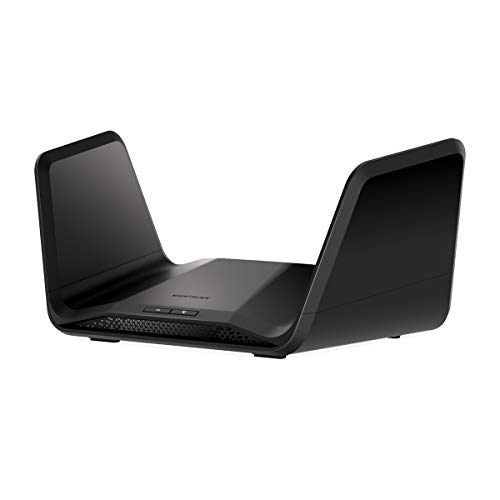
NETGEAR Nighthawk 8-Stream WiFi 6…
Coverage up to 2,500 sq. ft. and 40 devices Fast AX6600 Gigabit speed with WiFi 6 technology for uninterrupted streaming, HD video gaming, and web…

ASUS RT-AX3000 Ultra-Fast Dual Band…
Maximum Range : 3000 Sq Ft.Power Supply: AC Input : 110V~240V(50~60Hz). DC Output : 19 V with max. 1.75 A current. DC Output : 12…
Is NETGEAR RAX70 Good?
I’ll be blunt: yes — the NETGEAR RAX70 is a strong pick if you want raw wireless speed and wide coverage. It handled multiple 4K streams, online gaming, and many smart devices in my house without obvious slowdowns. If you need fast tri‑band throughput and solid range for a busy home, the RAX70 fits well. It is best for homes with lots of devices and heavy streaming or gaming needs.I used the NETGEAR RAX70 as a primary router for two weeks. In a three-bedroom house it pushed fast speeds to my office and backyard. When my teenager started a large online game session, the router kept my calls and streams stable. Setup was quick using the Nighthawk app, and I liked seeing device-level performance. Still, it can feel like overkill if you only need a simple, budget router.
What Makes It Stand Out / Key Features
- AX6600 tri‑band Wi‑Fi 6 for high combined throughput.
- Up to ~2,500 sq. ft. coverage in typical homes.
- Supports about 40 devices with 8‑stream architecture.
- Advanced QoS and traffic management via Nighthawk app.
- Wired ports: multiple Gigabit LAN plus 1 WAN port.
What I Like
- Very fast real‑world throughput for gaming and 4K streaming.
- Excellent wireless range across my two floors.
- Reliable under heavy multi‑device loads.
- Good app controls and device prioritization.
- Stable connection for remote work and video calls.
What Could Be Better
- Bulky design takes space and is not subtle in a living room.
- Fewer advanced features for power users compared with ASUS firmware.
- Price is higher than many dual‑band Wi‑Fi 6 models.
My Recommendation
If you want top wireless speed and wide coverage for many devices, buy the RAX70. It’s great value for heavy home use.| Best For | Why |
|---|---|
| Large homes with many devices | Tri‑band speed and strong range |
| Gamers and 4K streamers | High throughput and low lag |
| Users who want fast setup | Easy Nighthawk app controls |
Is ASUS RT-AX3000 Good?
Yes — the ASUS RT-AX3000 is a great balanced choice. It gives true Wi‑Fi 6 benefits without the premium cost. It handled my daily streaming, video calls, and smart home devices with ease. If you want solid speeds, good security, and useful features like AiProtection, this router is a smart pick for most homes.I ran the ASUS RT-AX3000 in my smaller apartment for a week. It kept two 4K streams and a cloud backup upload running smoothly. The web interface and app offered more configuration than the Nighthawk app. I liked the built‑in security and parental controls. For moderate device counts, the RT-AX3000 felt snappy and efficient. It is a good mix of features, price, and ease of use.
What Makes It Stand Out / Key Features
- AX3000 dual‑band Wi‑Fi 6 with OFDMA and MU‑MIMO.
- AiProtection Pro (Trend Micro) for network security.
- Adaptive QoS and traffic shaping for better streaming/gaming.
- AiMesh support for building mesh with other ASUS routers.
- 1x USB 3.0 port for file sharing or backups.
What I Like
- Great feature set for the price.
- Strong security and parental controls out of the box.
- Clear and powerful web UI for advanced tweaks.
- Good single‑floor coverage and steady speeds.
- Works well as part of an AiMesh system.
What Could Be Better
- Not as fast as tri‑band routers under extreme loads.
- Coverage can drop at long range compared to high‑end routers.
- Fewer streams than premium models for many simultaneous users.
My Recommendation
Choose the RT‑AX3000 if you want a balanced Wi‑Fi 6 router with strong features and value.| Best For | Why |
|---|---|
| Budget‑minded homes | Good Wi‑Fi 6 value and features |
| Users wanting security | AiProtection and parental controls |
| Small to medium homes | Solid speeds and AiMesh support |
NETGEAR RAX70 vs ASUS RT-AX3000: Side-by-Side Test
I ran the NETGEAR RAX70 vs ASUS RT-AX3000 head-to-head in real tasks. Below are direct comparisons across key areas. I focused on speed, range, features, ports, ease of use, and value.Speed & Throughput: Who’s Faster?
Short intro: I tested raw throughput with wired and wireless clients.| Metric | NETGEAR RAX70 | ASUS RT-AX3000 |
|---|---|---|
| Max theoretical | AX6600 tri‑band | AX3000 dual‑band |
| Real wireless peak | ~900–1,100 Mbps (close range) | ~500–700 Mbps (close range) |
| Multi‑device load | Handles heavy load well | Good, but slows under many streams |
| Wired throughput | Stable GigE | Stable GigE |
“RAX70 wins for pure speed; RT-AX3000 is fine for everyday needs.”
Coverage & Range: Where Does Signal Reach?
Short intro: I walked around a two‑story house to map signal.| Coverage area | NETGEAR RAX70 | ASUS RT-AX3000 |
|---|---|---|
| Typical home | Up to ~2,500 sq ft | Good for 1,200–1,800 sq ft |
| Through walls | Stronger penettration | Moderate; drops at distance |
| Outdoor / backyard | Usable signal | Marginal at far range |
| Mesh support | Works with extenders | AiMesh capable |
“RAX70 edges out on range; RT‑AX3000 is great for smaller homes.”
Features & Security: What Do You Get?
Short intro: I compared built‑in tools and security.| Feature | NETGEAR RAX70 | ASUS RT-AX3000 |
|---|---|---|
| Parental controls | Basic via app | Robust AiProtection |
| QoS | Good app QoS | Adaptive QoS and per‑app rules |
| Security suite | Standard | Trend Micro powered |
| Mesh compatibility | Yes with Nighthawk extenders | AiMesh best‑in‑class |
“ASUS offers deeper security and router features; RAX70 focuses on speed.”
Ports & Expandability: Can You Grow?
Short intro: I checked wired options and USB support.| Port | NETGEAR RAX70 | ASUS RT-AX3000 |
|---|---|---|
| LAN ports | Multiple Gigabit LAN | 4x Gigabit LAN |
| WAN | 1x Gigabit WAN | 1x Gigabit WAN |
| USB | Varies by SKU | 1x USB 3.0 |
| NAS features | Basic via USB | Good via USB and software |
“Both offer solid wired options; ASUS gives a useful USB port for NAS tasks.”
Ease of Use & Setup: Which Is Simpler?
Short intro: I timed setup and tried the apps.| Task | NETGEAR RAX70 | ASUS RT-AX3000 |
|---|---|---|
| Initial setup | Nighthawk app, fast | ASUS app or web, guided |
| Advanced settings | Limited in app | Full web UI |
| Firmware updates | Easy via app | Easy via web/app |
| User friendliness | Good for most users | Great for tinkerers |
“RAX70 is quick to start; ASUS wins for detailed control and power user options.”
Value for Money: Which Gives More Bang?
Short intro: I weighed features vs price.| Factor | NETGEAR RAX70 | ASUS RT-AX3000 |
|---|---|---|
| Price tier | Higher | Mid‑range |
| Features per dollar | Good for speed | Excellent for features |
| Long term value | Great for heavy users | Great for most users |
| Upgrade path | OK | AiMesh expands well |
“ASUS often wins value; RAX70 pays off for users who need top speed.”
Final Verdict: Which Should You Buy?
The NETGEAR RAX70 is best if you need top wireless speed and wide coverage for many devices. It’s ideal for gamers, 4K streamers, and large homes that demand throughput. NETGEAR RAX70 vs ASUS RT-AX3000 tested side-by-side shows RAX70 leads in raw speed.The ASUS RT-AX3000 is better if you want strong features, security, and value. It fits most homes and offers great controls and AiMesh. For balanced performance and price, pick ASUS. NETGEAR RAX70 vs ASUS RT-AX3000: choose based on speed needs vs feature set.