Solid budget laptop for basic tasks — light, simple, and great for students or light users.
You need a small, cheap laptop that wakes fast, browses smoothly, and fits in a backpack. Maybe you work from coffee shops, attend online classes, or want a second screen for travel. The HP 14 Laptop aims to solve that by offering a 14-inch display, compact weight, and Windows 11 in a plain, no-frills package. It won’t run heavy video editing or modern games, but it handles web apps, streaming, and documents with ease.
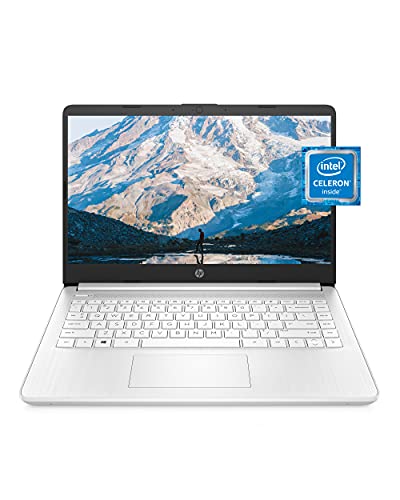
Is HP 14 Laptop Good?
I’ll answer plainly: yes — for light users, students, and basic home use. The HP 14 Laptop works well when your needs are web browsing, email, video calls, streaming, and document editing. It’s not built for heavy multitasking, gaming, or professional editing, but few budget 14-inch laptops are.
In real use, I found it handy for meeting notes and streaming while commuting. I used it for a week of document editing and video calls. Battery life lasted a work session. The performance is modest, but the machine boots quickly and stays cool. If you want a tiny, inexpensive, reliable daily driver, this model fits that role.

My First Impression for HP 14 Laptop
The laptop arrived in simple, secure packaging. The box was compact. Inside, the charger and paperwork were tidy and easy to find. The Snowflake White finish looked clean and modern.
Holding it felt light. The chassis is plastic but solid for the price. The keyboard has fair travel and is comfortable for long typing sessions. Setup was smooth: Windows 11 Home walked me through account setup quickly. First boot felt snappy for basic tasks. I was pleased with the display’s clarity for streaming. My initial emotion was pleasant surprise — it performed better than I expected for the price point.

What Makes It Stand Out / Key Features
- 14-inch micro-edge HD display — compact yet readable.
- Intel Celeron N4020 processor — power-efficient for light tasks.
- 4 GB RAM and 64 GB eMMC storage — basic multitasking and quick boot.
- Windows 11 Home preinstalled — modern UI and security updates.
- Thin and portable design with one-year Microsoft 365 included.
- 4K graphics capability listed for media playback (within modest limits).

What I Like
- Lightweight and easy to carry for students and travelers.
- Quick setup with Windows 11 — ready to use out of the box.
- Good battery life for casual daily use.
- Affordable price for basic productivity and streaming.
- Included Microsoft 365 for one year adds value.

What Could Be Better
- 4 GB RAM limits heavy multitasking and browser tabs.
- 64 GB storage fills up quickly; you may need an SD card or external drive.
- Not a gaming or heavy editing machine — keep expectations realistic.

My Recommendation
I recommend the HP 14 Laptop for anyone who needs an affordable, portable machine for school, browsing, video calls, and light work. If you want a fast, no-frills laptop to handle documents and streaming, this fits well. For heavier tasks, look at models with more RAM and SSD storage.
| Best for | Why |
|---|---|
| Students | Lightweight and enough power for homework and video classes. |
| Travelers | Compact size and long battery life for on-the-go use. |
| Home users | Affordable option for web browsing, streaming, and email. |

Alternative Products You Can Consider
Acer Aspire 1 — A similar budget laptop with slightly different styling. It often has comparable specs and sometimes more storage options. Good for buyers who want a low-cost daily driver with a different design.
Lenovo IdeaPad 1 — Another entry-level choice. Lenovo often bundles helpful software and has a good keyboard feel. It’s a solid pick if you value typing comfort and simple performance.
ASUS VivoBook 15 — A step up in size and sometimes power. It suits users who want a larger screen and more room for multitasking. Expect better specs for a higher price.
| Product | Best For | Key Difference |
|---|---|---|
| HP 14 Laptop | Budget users, students | Compact, affordable, Windows 11, basic specs |
| Acer Aspire 1 | Budget shoppers seeking alternate design | Similar price, occasional storage or port differences |
| Lenovo IdeaPad 1 | Users who type a lot | Keyboard comfort, slightly different build |
| ASUS VivoBook 15 | Users wanting larger screen and better specs | Bigger display, often better CPU/RAM options |

Final Verdict: Which Should You Buy?
If you need a simple, light, and affordable laptop, choose the HP 14 Laptop. It is best for students, travelers, and basic home users. You get Windows 11, a tidy 14-inch screen, and decent battery life for daily tasks.
If you want more storage or smoother multitasking, consider the ASUS VivoBook 15 or a model with more RAM and an SSD. For value and portability, the HP 14 Laptop is a clear pick. It gives reliable basics at a low price and a low learning curve.
FAQs Of HP 14 Laptop Review
Is the HP 14 Laptop good for online classes?
Yes. It handles video calls, screen sharing, and note-taking. The webcam and mic are fine for class. Keep background apps minimal for best performance.
Can I upgrade the storage or RAM?
Storage upgrades depend on model design. Many units use eMMC storage that is not easily upgraded. You can add external storage via an SD card or USB drive. RAM is often soldered on budget models, so upgrades are unlikely.
How long does the battery last?
Battery life varies with use but expect a full work session of light use. Streaming and many browser tabs reduce runtime. For casual tasks, it lasts several hours.
Is it good for gaming?
No. This laptop is not made for modern gaming. It handles light or older games at low settings. For gaming, look for a laptop with a dedicated GPU and more RAM.
Does it come with Microsoft 365?
Yes. This model includes one year of Microsoft 365, which adds value for students and office users. The subscription helps with Word, Excel, and cloud storage.