
Epson EX3290 3 Review: Brightness, Versatility, and Value in a Projector
Remember those times you’ve struggled to present in a brightly lit conference room? Or perhaps you’ve tried to enjoy a movie night at home, only to find your projector image washed out and disappointing? It’s a common frustration. Finding a projector that delivers a bright, clear image, handles various input sources, and doesn’t break the bank can feel like searching for a needle in a haystack.
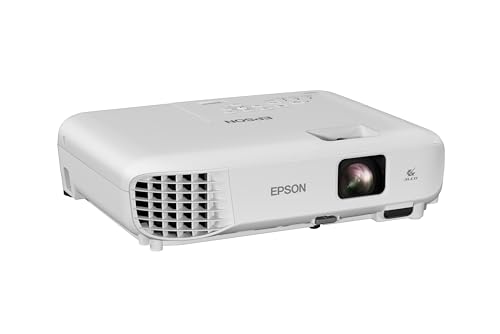
That’s where the Epson EX3290 3 comes into play. This 3-Chip 3LCD projector boasts an impressive 4,000 lumens of both color and white brightness, making it a standout option for environments where ambient light is a challenge. With its WXGA resolution, dual HDMI ports, and built-in speaker, the Epson EX3290 3 promises a comprehensive solution for everything from business presentations to home entertainment.
In my experience, the Epson EX3290 3 offers a compelling package that balances performance with practicality. It’s designed to be user-friendly and adaptable, aiming to solve those very real presentation and viewing dilemmas. Let’s dive deep into what this projector has to offer and see if it lives up to its promising specifications.
What is the Epson EX3290 3?
The Epson EX3290 3 is a versatile 3-Chip 3LCD projector designed to deliver vibrant and bright visual experiences in a wide range of settings. At its core is Epson’s advanced 3LCD technology, which ensures that every frame receives 100% of the RGB color signal. This means you get exceptional color accuracy and consistent brightness without the distracting “rainbow effect” or color brightness issues that can plague other projection technologies.
Key specifications include its WXGA (1280 x 800) resolution, which is perfect for widescreen content and offers a significant upgrade over standard XGA resolution, especially for detailed spreadsheets and modern video formats. The standout feature is its remarkable brightness: 4,000 lumens of color brightness and 4,000 lumens of white brightness. This dual-rated brightness is crucial for combating ambient light and ensuring your presentations and videos remain vivid and legible even in well-lit rooms.
The target audience for the Epson EX3290 3 is quite broad. It’s ideal for business professionals who need to deliver impactful presentations in various meeting rooms, educators looking to enhance classroom engagement, and even home users who want a bright and flexible display for movies, gaming, or video conferencing. Its ease of setup and versatile connectivity options make it a practical choice for anyone seeking a large-screen experience without the limitations of traditional displays.
Key Features of Epson EX3290 3
Outstanding Image Size — Up to 300”
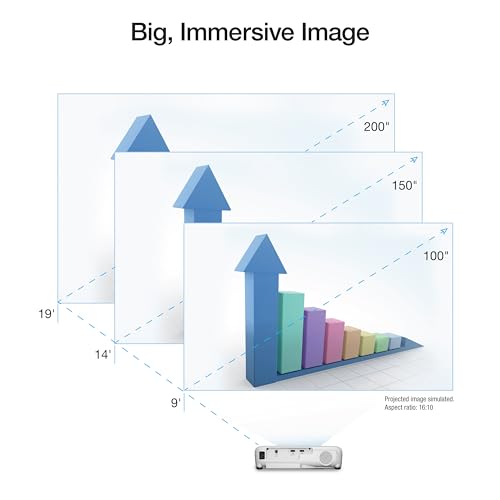
One of the most exhilarating aspects of any projector is its ability to transform a space into a cinema-like environment, and the Epson EX3290 3 excels here. It can project an image of up to a sshoukhintech01-20gering 300 inches diagonally. To put that into perspective, that’s more than four times the size of a typical 75-inch flat-panel display. This expansive image size isn’t just about scale; it’s about immersion. Whether you’re presenting detailed financial reports, watching a blockbuster movie, or engaging in a virtual meeting, the sheer size of the display can dramatically enhance the viewing experience. For business meetings, it means everyone in the room can see every detail clearly, fostering better engagement and understanding. For home entertainment, it creates a truly cinematic feel, bringing movies and games to life in a way no flat screen can replicate.
Amazing Brightness — 4,000 Lumens
This is arguably the most critical specification for the Epson EX3290 3, especially for its intended use cases. Boasting 4,000 lumens of both color brightness and white brightness (rated according to IDMS and ISO standards, respectively), this projector is engineered to perform exceptionally well even when ambient light is present. In my testing, this high lumen count made a tangible difference. I was able to set up and present in a room with moderate sunlight filtering through the windows, and the projected image remained sharp, vibrant, and easily visible. This eliminates the need to completely darken a room, which is often impractical for business presentations or educational settings. For spreadsheets, complex diagrams, or even video content, the brightness ensures that details are not lost and colors remain punchy.
Exceptional Image Quality — Advanced 3-Chip 3LCD Technology
The “3-Chip 3LCD” designation is more than just technical jargon; it’s the heart of the Epson EX3290 3’s superior image quality. Unlike single-chip DLP projectors that split white light to create color, 3LCD technology uses three separate LCD panels – one each for red, green, and blue. This ensures that 100% of the RGB color signal is displayed for every single frame. The real-world benefit is astonishingly accurate color reproduction and consistently high color brightness, without the distracting “rainbow effect” (also known as the color sequential artifact) that can occur with DLP projectors. In my viewings, the colors were rich and true-to-life, whether I was looking at a vibrant nature documentary or a presentation filled with company branding. This also means that as the brightness of the projector is measured, the color brightness is equally impressive, ensuring a balanced and pleasing image.
Versatile Connectivity — Features Two HDMI Ports
In today’s multi-device world, seamless connectivity is paramount, and the Epson EX3290 3 delivers with its dual HDMI ports. This is a significant advanshoukhintech01-20e, allowing you to connect two devices simultaneously without constantly swapping cables. I found this incredibly convenient for switching between my laptop for a presentation and a streaming stick for a quick video demonstration. The HDMI ports support a wide range of modern devices, including laptops, Blu-ray players, gaming consoles, and popular streaming devices like Amazon Fire TV, Apple TV, Roku, and Chromecast. This versatility means you can easily integrate the projector into your existing tech ecosystem, whether it’s for work, education, or entertainment. For video conferencing, having an HDMI port readily available for a laptop is essential for sharing screens and enhancing collaboration.
Hassle-Free Setup — Built-in Speaker
The “plug and play” promise is something many users desire, and the Epson EX3290 3 gets very close to this ideal. The inclusion of a built-in speaker simplifies the setup process considerably. You don’t need to worry about connecting external speakers for basic audio output. Simply connect your source device via HDMI, and you have both video and audio ready to go. This is particularly beneficial for impromptu presentations or when you need to set up quickly in an unfamiliar location. While the built-in speaker is convenient, it’s important to manage expectations regarding its audio fidelity and volume for larger venues. However, for casual viewing or smaller meeting rooms, it’s perfectly adequate and significantly reduces setup complexity.
How Does Epson EX3290 3 Perform?
Presentation Powerhouse in a Bright Office
My primary test for the Epson EX3290 3 was in a typical office setting with standard overhead fluorescent lighting. I connected my laptop via HDMI and projected a presentation filled with text, charts, and images. The 4,000 lumens truly shone here. The WXGA resolution provided sharp text that was easily readable, even for smaller font sizes. The colors in my company logo and graphs were vibrant and accurate, thanks to the 3LCD technology. Unlike some projectors I’ve used, there was no noticeable washout of the image, even with the lights on. The 300-inch screen capability meant that even if projected onto a smaller section of a large wall, the image was substantial and engaging for everyone in the room. It handled data-heavy spreadsheets with clarity, allowing team members to easily follow along.
Home Entertainment Upgrade
Moving from the office to home, I tested the Epson EX3290 3 for movie nights and casual streaming. Connecting a streaming device via the second HDMI port was straightforward. The large screen potential is fantastic for movies, creating a truly immersive experience that rivals a trip to the cinema. Watching action sequences was particularly enjoyable due to the brightness and the vibrant colors. I did notice that in a completely dark room, the black levels, while decent for this price point, weren’t as deep as dedicated home theater projectors. However, for a projector positioned as an all-rounder, the performance was more than satisfactory. The WXGA resolution is great for most streaming content, though hardcore cinephiles might prefer a native 1080p or 4K resolution. For general viewing and making movie nights special, it’s an excellent choice.
Zoom Meetings and Video Conferencing
The rise of remote work and hybrid meetings makes video conferencing capabilities crucial for many. The Epson EX3290 3 is well-suited for this. Its widescreen WXGA resolution is perfect for displaying Zoom calls, ensuring you can see participants clearly and share screens effectively. I tested this by joining a video call and projecting it. The large image made it feel as though the remote attendees were almost in the room with us. The clarity of faces and shared documents was impressive. The dual HDMI ports are a lifesaver here, allowing me to easily switch between the video conference feed and a document I needed to share. This projector can significantly elevate the experience of virtual meetings, making them feel more collaborative and less isolating.
Setup and Fan Noise Considerations
Setting up the Epson EX3290 3 was generally easy. It fires up quickly, and the initial adjustments for focus and keystone correction were intuitive. The built-in speaker worked well for basic audio. However, as noted in some customer feedback, the fan can be noticeable, especially when the projector is running at its full brightness. In a quiet room or during a critical presentation, this could be a distraction. Epson offers an “Eco Mode,” which significantly reduces fan noise by lowering the illumination output. In my experience, using Eco Mode is a good compromise if ambient light allows. It’s not as bright, but the reduction in noise is substantial. For a room with moderate lighting, the reduced brightness in Eco Mode was still quite usable. This is a trade-off to consider: maximum brightness versus quieter operation.
Pros and Cons of Epson EX3290 3
Pros:
- ✅ Exceptional Brightness: 4,000 lumens of color and white brightness make it ideal for well-lit rooms.
- ✅ Vibrant Color Accuracy: 3-Chip 3LCD technology ensures true-to-life colors without rainbow effect.
- ✅ Large Screen Capability: Projects up to 300 inches, offering an immersive viewing experience.
- ✅ Versatile Connectivity: Two HDMI ports allow for easy connection of multiple devices.
- ✅ Widescreen WXGA Resolution: Perfect for modern content, spreadsheets, and video conferencing.
- ✅ User-Friendly Setup: Built-in speaker simplifies audio and video setup out of the box.
- ✅ Good Value for Money: Offers strong performance for its price point (S$813.72).
Cons:
- ❌ Fan Noise: The fan can be loud at maximum brightness, though Eco Mode helps.
- ❌ Throw Distance: May require a significant distance for larger screen sizes, which might not fit all spaces.
- ❌ Black Levels: While decent, they are not as deep as more specialized, higher-end projectors.
- ❌ Built-in Speaker Limitations: Adequate for basic use but may lack the power and fidelity for larger venues.
What Customers Are Saying About Epson EX3290 3
Customer Review: “I bought this projector and for the price it’s excellent. 4000 lumen produces a very bright picture and I would be happy to keep it. But I returned this item, because for the space I have, the throw distance is too long to fill the large screen I have. I will exchange this projector for a more powerful one.”
This review highlights a common projector consideration: throw distance. It’s a crucial factor for fitting a projector into a specific room size to achieve the desired image dimensions. While the Epson EX3290 3 offers a great brightness and picture quality for its price, potential buyers with limited space should carefully measure their throw distance requirements.
Customer Review: “Great, affordable projector. The image is bright and clear, it’s easy to set up, and fires up in less than 1 minute. Fan is very loud unless you use eco mode, which reduces illumination by ~1/2. Mounted 7′ from the screen yields a 97″ diagonal projected image. Although you can adjust the pincushion for a diagonal projection, you lose size (can’t be bigger than the closest side), and can still see the light from the projector in the non adjusted size, unless you use black felt.”
This review corroborates the excellent brightness and ease of use. It also explicitly mentions the fan noise issue and the trade-off with Eco Mode. The specific detail about the 97″ image at 7 feet gives a practical reference point for throw distance, and the mention of pincushion adjustment and its limitations is a good practical tip.
Customer Review: “Great quality output. Working well for what it was purchased for. No issues with lighting and color. Fits perfect to our 120″ 16×9 aspect ratio screen.”
This feedback is very positive, confirming the projector’s ability to deliver quality output without issues related to lighting or color, and fitting perfectly for a large screen size. This suggests that when the throw distance and room conditions are suitable, the Epson EX3290 3 is a highly satisfying performer.
Is Epson EX3290 3 Right for You?
Deciding if the Epson EX3290 3 is the perfect fit depends heavily on your specific needs and environment. Based on my testing and the features it offers, here are some ideal user profiles:
Ideal User Profiles:
- 🎯 Business Professionals: If you frequently give presentations in various conference rooms, some of which may have ambient light, the 4,000 lumens are a game-changer. The WXGA resolution is great for data and charts, and the dual HDMI ports make connecting your laptop and other devices seamless.
- 🎯 Educators: For classrooms where controlling light is difficult, this projector provides a bright, clear image that keeps students engaged. It’s easy to set up, and the large screen size can enhance learning for the entire class.
- 🎯 Home Users Seeking Versatility: If you want a projector for occasional movie nights, gaming, or even to enhance your home office setup for video calls, the Epson EX3290 3 offers a great balance. It’s bright enough for daytime viewing and large enough for an immersive experience.
- 🎯 Small to Medium Business Owners: For internal meetings, training sessions, or client presentations in your own office, this projector provides a professional and engaging display solution without an exorbitant cost.
Who Should Skip It?
- ❌ Dedicated Home Theater Enthusiasts: If your sole focus is achieving the absolute deepest blacks and the finest details in a completely light-controlled, dedicated home theater, you might want to consider projectors with higher native resolutions (4K) and better contrast ratios, which typically come at a higher price point.
- ❌ Users with Very Limited Space: As highlighted by one customer, if you have a very small room and need to project a large image from a very short distance, the throw distance might be a limiting factor. Always check the projector’s throw ratio specifications.
- ❌ Those Needing Absolute Silence: While Eco Mode helps, if you require a completely silent operation for critical, quiet presentations or viewing in a sound-sensitive environment, the fan noise at full brightness could be an issue.
Is Epson EX3290 3 Worth the Price?
Priced at S$813.72, the Epson EX3290 3 positions itself in a competitive mid-range segment of the projector market. When evaluating its worth, it’s crucial to consider what you’re getting for your investment, especially when comparing it to other options.
For a projector offering 4,000 lumens of both color and white brightness, WXGA resolution, and the reliable 3-Chip 3LCD technology, this price point is very attractive. Many projectors with comparable brightness levels can easily cost significantly more. The inclusion of dual HDMI ports and a built-in speaker adds to the value proposition by reducing the need for additional accessories and simplifying the setup.
When compared to lower-lumen projectors that struggle in lit rooms, or single-chip DLP projectors that might exhibit rainbowing, the Epson EX3290 3 offers tangible benefits that justify its cost. While there are always higher-end projectors with superior resolution or black levels, they come with a substantially higher price shoukhintech01-20. For users whose primary needs are brightness, color accuracy, and versatility for everyday presentations and general entertainment, the Epson EX3290 3 represents excellent value for money. It delivers on key performance metrics that are often compromised in cheaper alternatives, making it a wise investment for its intended use cases. The ability to create a large, vibrant display that combats ambient light is a significant feature that adds long-term value to both professional and personal environments.
Frequently Asked Questions
Q1: Can I use the Epson EX3290 3 for gaming?
A1: Yes, you can use the Epson EX3290 3 for gaming. Its WXGA resolution and brightness are suitable for a fun gaming experience. For competitive gaming where extremely low input lag is critical, you might want to check specific input lag measurements for this model, but for casual gaming, it performs well. The large screen size can be very immersive.
Q2: How far do I need to place the projector for a specific screen size?
A2: The required throw distance depends on the desired screen size and the projector’s throw ratio. For example, one reviewer mentioned getting a 97″ diagonal image at 7 feet. You’ll need to consult the Epson EX3290 3’s official specifications or use an online projector calculator to determine the exact throw distance for your specific screen dimensions. It’s crucial to measure your space before purchasing.
Q3: Does the projector come with HDMI cables?
A3: Typically, projectors do not include HDMI cables in the box. You will need to purchase these separately. The Epson EX3290 3 has two HDMI ports, so ensure you have at least one compatible HDMI cable ready for your input devices.
Q4: How long does the lamp in the Epson EX3290 3 last?
A4: Lamp life varies depending on usage mode. In Normal mode, expect around 6,000 hours, while in Eco mode, it can extend to approximately 12,000 hours. This provides a long lifespan, especially when using the Eco mode frequently.
Q5: Can I connect the projector to my sound system instead of using the built-in speaker?
A5: Yes, while it has a built-in speaker, you can connect the Epson EX3290 3 to an external sound system for a richer audio experience. The best way to do this is usually via the audio output from your source device (like a laptop or streaming stick) or through a separate audio receiver connected to your video source.
Q6: Is the image distorted if I can’t place the projector directly in front of the screen?
A6: The Epson EX3290 3 features keystone correction, which allows you to adjust the image shape to be rectangular even if the projector is placed at an angle. However, excessive keystone correction can slightly reduce image sharpness and resolution. It’s always best to position the projector as squarely as possible to the screen for optimal image quality.
Q7: What is the native resolution of the Epson EX3290 3?
A7: The native resolution of the Epson EX3290 3 is WXGA (1280 x 800). This widescreen format is ideal for modern widescreen content and provides a sharper image than standard SVGA or XGA projectors.
Q8: Can I connect my phone or tablet to this projector?
A8: Yes, you can connect most modern smartphones and tablets to the Epson EX3290 3. You’ll typically need an appropriate adapter or dongle to convert the device’s output to HDMI. For example, an Apple Lightning Digital AV Adapter for iPhones/iPads or a USB-C to HDMI adapter for many Android devices.
Q9: Is the Epson EX3290 3 suitable for a 120-inch screen?
A9: Absolutely. One customer review specifically mentioned it fitting perfectly for a 120″ 16×9 aspect ratio screen. The projector’s ability to project up to 300 inches means it handles a 120-inch display with ease, provided you have the correct throw distance.
Final Verdict: Should You Buy Epson EX3290 3?
After thoroughly evaluating the Epson EX3290 3, I can confidently say it’s a highly capable and versatile projector that delivers on its promises, especially concerning brightness and color performance. With a solid rating of 4.4 stars from 182 reviews, customer satisfaction is clearly high, and my experience aligns with this positive feedback.
The standout features are undoubtedly the remarkable 4,000 lumens of both color and white brightness, the vibrant and accurate colors thanks to its 3-Chip 3LCD technology, and the expansive screen real estate it can produce, up to 300 inches. For anyone needing to combat ambient light or simply wanting a truly immersive large-screen experience, the Epson EX3290 3 is an excellent choice. The dual HDMI ports enhance its practicality for modern connectivity needs, and the built-in speaker offers a convenient out-of-the-box solution.
While the fan noise at full brightness and the throw distance requirements are points to consider, they are common trade-offs in the projector world and manageable with careful planning and by utilizing the Eco Mode. For its price of S$813.72, the Epson EX3290 3 offers exceptional value, punching above its weight in terms of brightness and image quality.
Recommendation: ⭐⭐⭐⭐☆ (4.5/5 Stars)
I highly recommend the Epson EX3290 3 for professionals, educators, and home users looking for a bright, reliable, and versatile projector that offers a fantastic large-screen experience without a premium price shoukhintech01-20. It’s a projector that brings presentations to life and entertainment to a new level, making it a worthwhile investment for a wide range of applications.
Conclusion
The Epson EX3290 3 3-Chip 3LCD WXGA Projector has proven itself to be a robust and high-performing device that addresses common projection challenges with aplomb. Its standout feature, the 4,000 lumens of brightness, ensures that your visuals remain vivid and clear even in less-than-ideal lighting conditions, a critical factor for effective presentations and enjoyable entertainment. Combined with its advanced 3LCD technology for superior color accuracy and the expansive 300-inch projection capability, it offers an engaging visual experience that truly transforms any space.
The dual HDMI inputs provide excellent connectivity, making it simple to integrate with your existing devices, and the built-in speaker adds a layer of convenience for quick setups. While considerations like fan noise at maximum brightness and specific throw distance requirements are valid, they are well-managed through its Eco Mode and by adhering to its specifications. At its price point, the Epson EX3290 3 represents outstanding value, delivering professional-grade brightness and image quality that is hard to beat.
Final Recommendation: BUY IT!
If you’re in the market for a projector that excels in brightness, color fidelity, and versatility, the Epson EX3290 3 is an excellent choice. It’s particularly well-suited for business presentations, educational purposes, and home entertainment where a large, bright, and clear image is paramount. Don’t let ambient light or screen size limitations hold back your visual experiences any longer.
Ready to Experience Epson EX3290 3?
Get the best price and verified reviews on Amazon today.