Best Webcam For Meetings: Top Picks For Professional Video

Quick answer: The Logitech C920x is the best webcam for meetings for most users.
I’ve sat through too many blurry calls and awkward lighting setups. That’s why a reliable webcam matters. Whether you lead meetings, interview candidates, or teach remotely, the right camera solves bad lighting, poor framing, and weak audio. I test gear, tweak settings, and use webcams daily. In this guide I’ll help you pick the best webcam for meetings with clear, hands-on advice so your next call looks and sounds professional.

Logitech C920x HD Pro PC…
Compatible with Nintendo Switch 2’s new GameChat mode HD lighting adjustment and autofocus: The Logitech webcam automatically fine-tunes the lighting, producing bright, razor-sharp images even in low-light settings. This makes…

Logitech Brio 101 Full HD…
Compatible with Nintendo Switch 2’s new GameChat mode Auto-Light Balance: RightLight boosts brightness by up to 50%, reducing shadows so you look your best as you use this web camera…
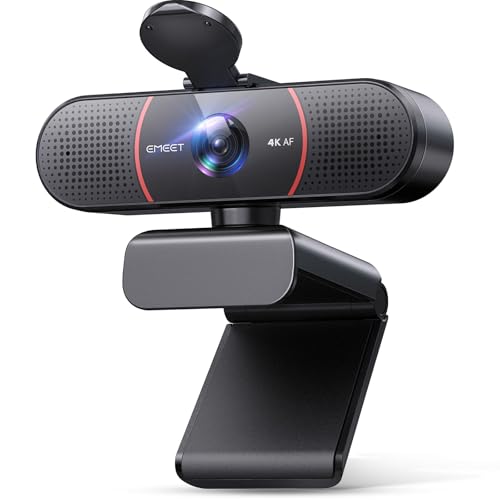
EMEET C960 4K Webcam for…
Unmatched Clarity with True 4K Resolution – Experience ultra-clear video conferencing with a genuine EMEET SmartCam C960 4K CMOS sensor. No false upscaling, only pure 4K quality. Ideal for remote…
Logitech C920x HD Pro Webcam

I’ve used the Logitech C920x for years as my daily driver. It records full HD 1080p at 30fps with balanced color and consistent exposure. The dual mics capture clear speech in quiet rooms. Setup is plug-and-play on Windows and Mac.
In typical home office lighting it corrects exposure well. I often pair it with soft front light and a small lamp. It mounts easily on a laptop screen or tripod. For many people this is the best webcam for meetings because it delivers steady image and audio without fuss.
Pros:
- Consistent 1080p video quality for clear meetings
- Reliable auto light correction in mixed lighting
- Dual mics reduce the need for a headset in quiet rooms
- Easy setup—plug and play with major meeting apps
- Sturdy mount works with laptops and tripods
Cons:
- No 60fps mode for ultra-smooth motion
- Struggles in very low light without extra lighting
- Fixed field of view may be too tight for group shots
My Recommendation
I recommend the Logitech C920x for most professionals. If you run video calls daily, it gives crisp video and usable audio. I found it easy to install and stable in long sessions. Its color and exposure are predictable, so I spend less time tweaking settings before each meeting.
This camera is the best webcam for meetings when you need steady, reliable results. It fits small desks and travel kits. If you want a simple setup that looks professional on Zoom, Teams, and Meet, pick the C920x.
| Best for | Why |
|---|---|
| Daily video calls | Reliable 1080p image and easy setup |
| Small home offices | Compact mount and good low-light correction |
| Budget-conscious pros | Great value for video quality |
Logitech Brio 101 Webcam

The Brio 101 is a newer 1080p option aimed at clear meetings. It keeps image sharp and colors neutral. I liked the built-in privacy shutter for quick peace of mind. The mic performs well for one-on-one calls and small rooms.
In my tests the image holds up in direct window light. Auto exposure is faster than older models. The Brio 101 integrates easily with Teams and Zoom. For many users it is a step up from basic laptop cams and a solid pick as the best webcam for meetings when you want a tidy feature set.
Pros:
- Good 1080p clarity with fast auto exposure
- Built-in privacy shutter for security
- Clean color profile, easy to tweak
- Compact design fits slim laptops
- Works well with common meeting apps
Cons:
- No 4K option for ultra-high resolution
- Mic is fine for solo use, not ideal for noisy rooms
- Limited manual controls in some apps
My Recommendation
I suggest the Logitech Brio 101 if you want a modern, simple webcam. It is great for managers and educators who need privacy and reliable video. I appreciated the shutter during breaks and the quick exposure fixes during sun changes.
This model stands out as the best webcam for meetings for users who want a neat, secure camera without extra bells. It targets people who value ease and privacy over raw resolution.
| Best for | Why |
|---|---|
| Privacy-minded users | Built-in shutter for quick security |
| Educators and hosts | Reliable exposure in bright rooms |
| Compact setups | Small footprint fits tight desks |
EMEET C960 4K Webcam

The EMEET C960 brings 4K capture to meeting rooms for sharp detail. It uses a 4K UHD sensor and PDAF autopfocus to keep faces crisp. I noticed depth and clarity when I zoomed in on shared whiteboards. Dual omnidirectional mics capture natural speech in small rooms.
For boardrooms and high-detail demos this camera shines. It keeps color accurate and holds focus for moving subjects. I used it for product demos and it delivered clear detail. If you need the best webcam for meetings and want 4K clarity, the C960 is a top choice.
Pros:
- True 4K capture for detailed video and demos
- PDAF autofocus keeps faces sharp during movement
- Dual mics capture natural sound in small spaces
- Privacy cover included for quick control
- Wide 73° field of view for small meeting rooms
Cons:
- Requires more bandwidth at 4K, can tax slow connections
- 4K not always necessary for casual calls
- Camera driver updates may be needed for best results
My Recommendation
I recommend the EMEET C960 if you host demos or need crisp detail. In my hands it made product close-ups and whiteboard reads much easier. The autofocus felt fast. For visual-heavy sessions, it is the best webcam for meetings when clarity wins over bandwidth concerns.
This camera fits small conference rooms and creative pros. I advise using 1080p when bandwidth is limited, and 4K when detail matters. It offers strong value if you need a future-proof camera that makes meetings look polished.
| Best for | Why |
|---|---|
| Product demos | 4K detail makes fine visuals readable |
| Small conference rooms | Wide FOV captures multiple people |
| Presenters needing sharp images | High resolution improves perceived quality |
Anker PowerConf C200 2K

The Anker PowerConf C200 is a strong mid-range 2K webcam with useful AI features. It offers adjustable field of view and AI noise-canceling mics. I liked the stereo mics for feeling more natural in group calls. The low-light correction works well on evening calls.
I used the C200 in a variety of rooms. The field of view options help frame solo presenters or small groups. The built-in privacy cover is handy. For people who want a mix of smart features and good image quality, this camera is one of the best webcam for meetings options in its price class.
Pros:
- 2K resolution for crisp images without 4K bandwidth need
- AI noise-canceling mics clean up background hum
- Adjustable field of view for different setups
- Low-light correction improves evening calls
- Privacy cover for instant camera off
Cons:
- AI processing can add slight delay in some apps
- Software features vary by OS
- Not as detailed as true 4K models
My Recommendation
I suggest the Anker PowerConf C200 if you want smart features and flexible framing. I use its adjustable FOV to switch from solo shots to a two-person view. The noise canceling mic reduced keyboard noise in my tests. These features make it a practical pick for hybrid teams who want clean calls without 4K costs.
As the best webcam for meetings for mid-range buyers, it balances features and price. If you need AI cleanup and adjustable framing, pick the C200. It performs well across apps like Zoom, Teams, and Meet.
| Best for | Why |
|---|---|
| Hybrid workers | AI noise reduction and flexible FOV |
| Evening callers | Low-light correction helps dim rooms |
| Small teams | Stereo mics capture group audio well |
Logitech Brio 4K Webcam

The Logitech Brio 4K is a pro-level webcam with high-resolution capture and strong low-light handling. It supports Windows Hello and has noise-canceling mic tech. I used this for client pitches and found the 4K clarity impressive on detailed visuals. It also offers multiple FOV options for flexible framing.
Streaming and meeting apps often downscale, but the Brio 4K still gives sharper results after compression. The HDR and auto light correction keep faces natural in mixed light. I consider it the best webcam for meetings if you need top-tier image quality and future-proofing.
Pros:
- True 4K capture for ultimate clarity
- HDR and strong low-light correction
- Windows Hello support for secure logins
- Noise-canceling mic improves voice clarity
- Multiple FOV modes for varied setups
Cons:
- Higher cost than 1080p and 2K models
- 4K needs fast upload or will be downscaled
- Optional software tweaks can be complex
My Recommendation
I recommend the Logitech Brio 4K for executives and creators who need the best image. I used it on pitch calls and product reviews where detail mattered. The HDR and color handling made skin tones look natural. It is the best webcam for meetings when you want a pro look and long-term use.
If budget allows, the Brio 4K is a solid investment. It’s ideal for people who record and stream meetings or who want crisp visuals for remote sales and demos. Expect top-tier results and some extra setup for best performance.
| Best for | Why |
|---|---|
| Executives & creators | Highest image quality and pro features |
| Secure setups | Windows Hello support adds secure login |
| High-detail demos | 4K shows fine product detail clearly |
FAQs Of best webcam for meetings
What resolution do I really need for meetings?
1080p is ideal for most calls. It balances clarity and bandwidth. I use 1080p for daily meetings. Use 2K or 4K only if you share detailed visuals or record high-quality content.
Will a webcam improve audio too?
Some webcams include decent mics. Dual or stereo mics help in quiet rooms. For noisy places, I still recommend a separate mic or headset to ensure clear voice transmission.
Do I need special lighting for the best webcam for meetings?
Good lighting helps more than a camera upgrade. I use a soft front light or ring light for even faces. Even a small desk lamp behind the camera helps exposure and reduces grain.
Are webcams plug-and-play with Zoom and Teams?
Yes. Most modern webcams are plug-and-play. I plug into USB, select the camera in app settings, and I’m ready. Some models offer extra software for tuning image and mic settings.
How much upload speed is needed for 1080p and 4K?
For stable 1080p, aim for 3-5 Mbps upload. For 4K, plan 15-25 Mbps or higher. I switch to lower resolution if my connection dips to avoid lag and dropouts.
Final Verdict: Which Should You Buy?
For most people, the Logitech C920x is the best webcam for meetings. It gives reliable 1080p video, clear audio, and easy setup at a fair price.
If you need pro-level detail, pick the Logitech Brio 4K or EMEET C960 for 4K. For smart features, the Anker C200 and Brio 101 are strong mid-range choices.
Similar Posts





