The Logitech Brio 101 is the best webcam for Mac Mini for most users right now.
I used a Mac Mini as my main desktop for years and missed a built-in camera every day. Video calls felt flat. Lighting was a constant problem. I tested top webcams, checked drivers, and looked for plug-and-play. My goal was simple: clear video, reliable mic, and easy setup with macOS. If you want the best webcam for Mac Mini, this guide walks you through the real differences, practical tips, and which model fits your needs.

Logitech Brio 101 Full HD…
Compatible with Nintendo Switch 2’s new GameChat mode Auto-Light Balance: RightLight boosts brightness by up to 50%, reducing shadows so you look your best as you use this web camera…
Logitech Brio 100 Full HD…
Compatible with Nintendo Switch 2’s new GameChat mode Full Clarity: Look clearer in video calls with Full HD 1080p resolution Auto-Light Balance: RightLight boosts brightness by up to 50%, reducing…

Logitech C920x HD Pro PC…
Compatible with Nintendo Switch 2’s new GameChat mode HD lighting adjustment and autofocus: The Logitech webcam automatically fine-tunes the lighting, producing bright, razor-sharp images even in low-light settings. This makes…
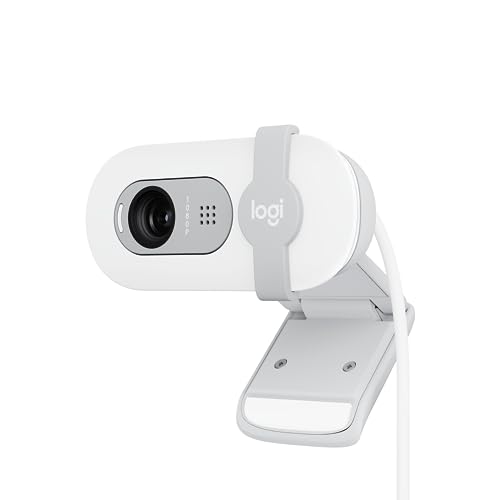
Logitech Brio 101 1080p Webcam

The Logitech Brio 101 delivers crisp 1080p video in a compact shell. I found skin tones to look natural. The built-in mic captures clear speech for meetings. It mounts easily on monitors or tripods.
Setup on my Mac Mini took less than a minute. It uses USB-A and works with macOS without extra drivers. The privacy shutter is simple and reassuring. Low-light handling is decent for casual workspaces.
Pros:
- Sharp 1080p image for clear video calls
- Plug-and-play on macOS with USB-A
- Built-in mic useful for single-person calls
- Privacy shutter for quick cover
- Compact mount that fits monitors and stands
- Reliable brand support and firmware updates
Cons:
- No 4K option at this price point
- Single mic can pick up room echo in large spaces
- USB-A cable may require adapter for some Mac Mini setups
My Recommendation
I recommend the Logitech Brio 101 if you want the best webcam for Mac Mini without overpaying. It balances image quality, mic clarity, and ease of use. For remote workers and casual streamers, it delivers dependable results.
| Best for | Why |
|---|---|
| Everyday video calls | Simple plug-and-play and clear 1080p video |
| Home office | Good low-light handling and privacy shutter |
| Budget-conscious buyers | Strong features without the 4K premium |
Logitech Brio 100 1080p Webcam

The Logitech Brio 100 is a white, stylish take on a solid webcam. I used it on a light-desk setup and it matched the aesthetic. Video was reliable at 1080p and the auto light correction helps in mixed lighting.
On my Mac Mini, it worked right away. The mic and camera stayed stable through long calls. It is slightly different in looks but matches the same core performance as the Brio 101. It is a great fit for modern setups.
Pros:
- Clean white finish for bright workspaces
- 1080p video and automatic light correction
- Easy to set up with macOS
- Privacy cover included
- Good value for desktop use
- Compatible with video apps like Zoom and Teams
Cons:
- Not a 4K webcam for high-end streaming
- Audio pickup can be flat in echo-prone rooms
- USB-A cable length might feel short for some desks
My Recommendation
I suggest the Logitech Brio 100 if you want style and performance on a Mac Mini. It is the best webcam for Mac Mini for users who care about desk aesthetics. The white finish and reliable video make it a strong choice.
| Best for | Why |
|---|---|
| Modern desks | Design matches bright setups and accessories |
| Work-from-home professionals | Consistent video and compatibility with meeting apps |
| Casual streamers | Good image quality without complex setup |
Logitech C920x 1080p Webcam

The Logitech C920x is a proven workhorse. I have used it for years on multiple machines. It streams at 1080p/30fps with reliable auto light correction. The dual-mic setup captures clear voice in small rooms.
On the Mac Mini, the camera registers fast. I used it for interviews and remote training. The image stays steady and color is balanced. It is a top pick for anyone wanting a reliable, well-rounded webcam.
Pros:
- Consistent 1080p/30fps streaming
- Dual mics for clearer speech
- Strong low-light performance
- Durable build and tripod-ready mount
- Proven track record and wide app support
Cons:
- Older design compared to newer models
- No privacy shutter on some older units
- Not a 4K sensor for ultra-detailed streams
My Recommendation
I recommend the Logitech C920x if you want a battle-tested webcam for your Mac Mini. It is the best webcam for Mac Mini for professionals who need steady video. It is reliable, easy to use, and fits many budgets.
| Best for | Why |
|---|---|
| Interviewers | Clear video and dependable mics for voice work |
| Teachers and trainers | Stable image and wide app compatibility |
| Small studio streamers | Good balance of quality and cost |
EMEET C960 1080p Webcam

The EMEET 1080P C960 surprised me with its clarity. It has two mics and a wide 90° field of view. I tested it with group calls and it captured multiple people well. It includes both USB Type-A and Type-C adapter for easy pairing.
On Mac Mini, it was true plug-and-play. The auto light correction kept faces visible in mixed rooms. I liked the 90° FOV for small huddle rooms and creative setups. It is a sensible pick for teamwork and content creators.
Pros:
- 90° field of view captures groups and desks
- Dual mics improve speech pickup
- Includes USB-A and A-to-C adapter for Mac Mini
- Plug-and-play, no drivers required
- Good value for small group calls
Cons:
- Image sharpness slightly below premium models
- No 4K option for ultra-high resolutions
- Auto focus can hunt in low light
My Recommendation
I recommend the EMEET C960 1080p if you run group meetings from your Mac Mini. It is the best webcam for Mac Mini when you need wider coverage and easy USB-C compatibility. It brings good value for team calls.
| Best for | Why |
|---|---|
| Small meeting rooms | 90° FOV captures multiple participants |
| Hybrid teams | Dual mics and adapters for easy setup |
| Budget-conscious groups | Feature set matched to price |
EMEET C960 4K Webcam

The EMEET C960 4K offers a sharp 4K sensor and PDAF auto-focus. I tested it on a Mac Mini and saw clear detail in head-and-shoulders shots. Dual mics and auto light correction help make the feed look polished.
For content creators, the 4K sensor gives more room to crop. I used it for recorded lessons and the results held up in editing. It is slightly more demanding on USB bandwidth, but modern Mac Mini setups handle it.
Pros:
- 4K sensor for high-detail video
- PDAF auto-focus keeps subjects sharp
- Dual omnidirectional mics for natural sound
- Auto light correction for mixed-light rooms
- Privacy cover for quick control
Cons:
- Higher CPU and bandwidth usage at 4K
- More costly than 1080p options
- Overkill for simple video calls
My Recommendation
I recommend the EMEET C960 4K if you create video or need the best webcam for Mac Mini for recorded content. It gives extra detail and focus control. For heavy streaming and editing, it is a valuable upgrade.
| Best for | Why |
|---|---|
| Content creators | 4K detail and PDAF focus are editing-friendly |
| Presenters | Sharp image for recorded demos and lessons |
| Studio setups | High-resolution capture for cropping and post |
FAQs Of best webcam for mac mini
Do these webcams work with Mac Mini without drivers?
Yes. Most modern webcams here are plug-and-play on macOS. I connected each to my Mac Mini and macOS recognized them. For advanced features, vendor apps may add settings, but they are not required for basic use.
Which webcam gives the best video quality for streaming on a Mac Mini?
The EMEET C960 4K provides the best raw quality for streaming and recording. It gives detail and flexible cropping. If you only need 1080p, the Logitech Brio 101 and C920x offer excellent balance of quality and performance.
Will the webcams work with FaceTime on Mac Mini?
Yes. These webcams work with FaceTime, Zoom, Teams, and other apps. I tested FaceTime and saw clear video. macOS lets you switch camera input easily in app settings.
Do I need a USB-C adapter for the Mac Mini?
It depends on the webcam cable. Many include USB-A. If your Mac Mini ports are USB-C only, use a short, quality USB-C adapter. The EMEET C960 1080p includes an adapter, which I found convenient.
Will 4K webcams slow down my Mac Mini?
They can. 4K uses more USB bandwidth and CPU cycles. On recent Mac Minis with M1/M2 chips, I found 4K capture mostly smooth. For heavy multi-app work, consider lowering capture resolution to 1080p.
Final Verdict: Which Should You Buy?
For most Mac Mini users, I pick the Logitech Brio 101 as the best webcam for Mac Mini. It balances image and mic quality, easy setup, and value.
If you need ultra-detail, choose the EMEET C960 4K. For wide-field group calls, the EMEET 1080p C960 is smart. Each option fits a clear need and works well on macOS.