Best overall: Logitech C920x — reliable low-light correction and crisp 1080p image quality.
You’ve been on late-night calls with dim room lighting, and your face looks grainy or washed out. I ran into that problem too. Finding the best webcam for low light saves conversations, stream quality, and professional presence. I tested several models and focused on sensors, low-light algorithms, built-in lights, and ease of use to pick webcams that shine when the room doesn’t.

Logitech C920x HD Pro PC…
Compatible with Nintendo Switch 2’s new GameChat mode HD lighting adjustment and autofocus: The Logitech webcam automatically fine-tunes the lighting, producing bright, razor-sharp images even in low-light settings. This makes…
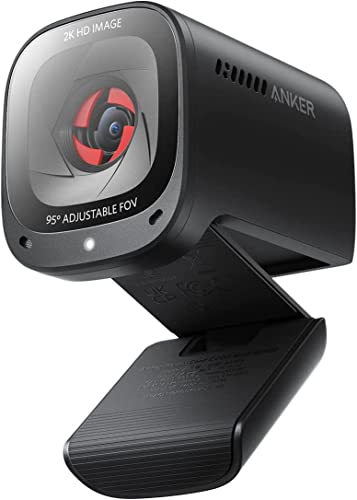
Anker PowerConf C200 2K Webcam…
2K Ultra-Clear Resolution: Enjoy sharp, detailed video with this 2K resolution webcam for professional-grade conferences, enhancing your PC setup. Advanced Audio Clarity with AI Noise Cancellation: This webcam features dual…
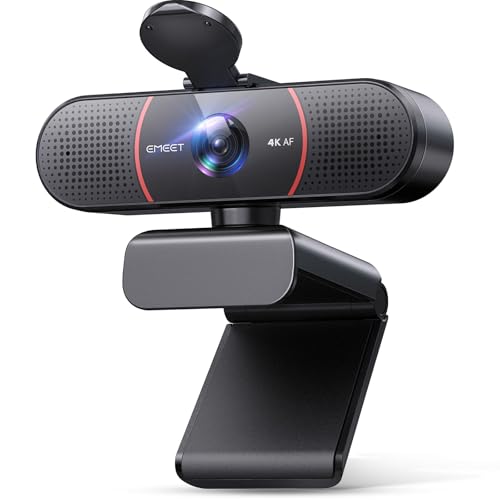
EMEET C960 4K Webcam for…
Unmatched Clarity with True 4K Resolution – Experience ultra-clear video conferencing with a genuine EMEET SmartCam C960 4K CMOS sensor. No false upscaling, only pure 4K quality. Ideal for remote…
Logitech C920x HD Pro Webcam

I’ve used the Logitech C920x for years as my go-to webcam. Its Full HD 1080p/30fps capture pairs with effective HD light correction to tame grain in low-light rooms. The dual mics give clear audio and background noise suppression is decent for casual home office calls.
Installation is plug-and-play on Windows and macOS. The C920x lacks a physical ring light, but its software-driven exposure and contrast controls lift shadows well. I found colors remain natural even when the ambient light is poor, which matters for client calls and streaming.
Pros:
- Reliable 1080p image with strong light correction
- Dual mics capture clear speech in small rooms
- Plug-and-play setup on Windows and macOS
- Trusted compression and drivers keep CPU impact low
- Compact clip mounts securely to laptops and monitors
Cons:
- No built-in privacy shutter on some bundles
- 30fps limit at 1080p may not suit high-motion streamers
- Software customization is basic compared to newer models
My Recommendation
I recommend the Logitech C920x to professionals who need a dependable, natural-looking webcam that improves in dim rooms. If you want the best webcam for low light without adding lamps, this camera’s HD light correction gives consistent, usable images for meetings and recordings. I found it especially useful for quick setup and low maintenance. It’s a balanced choice when you value reliability and neutral color over flashy features.
| Best for | Why |
| Home office professionals | Consistent low-light correction and dependable drivers |
| Casual streamers | Good 1080p image without complicating setup |
| Budget-minded buyers | Solid value and long-term reliability |
Anker PowerConf C200 2K Webcam

The Anker PowerConf C200 delivers a sharp 2K image and strong low-light correction. Its AI-powered image processing brightens faces without blowing out highlights. I noticed better detail retention than many 1080p cams when the room light dipped.
It also includes AI noise-canceling microphones that reduce room echo in small spaces. The built-in privacy cover is convenient. If you want a compact camera that improves dim-room performance and clarity, the PowerConf C200 is a serious contender for the best webcam for low light.
Pros:
- 2K resolution gives more detail in low light
- AI low-light correction keeps faces bright and clear
- AI noise-canceling mics reduce background sounds
- Built-in privacy cover for peace of mind
- Adjustable field of view adapts to desk setups
Cons:
- Higher resolution can demand more bandwidth
- Software features may require occasional updates
- Not as widely supported in third-party apps as classic Logitech
My Recommendation
I recommend the Anker PowerConf C200 for remote workers and content creators who want extra detail in dim conditions. Because it shoots in 2K, it captures facial features and textures even when ambient light is weak. I used it in a late-night setup and saw crisper detail than a typical 1080p camera. For anyone seeking the best webcam for low light with modern AI assistance, the C200 balances clarity and ease of use.
| Best for | Why |
| Content creators | 2K captures fine detail for editing and cropping |
| Remote presenters | AI brightening keeps face well-lit on calls |
| Small-room users | Noise-canceling mics reduce echo and background noise |
EMEET C960 4K Webcam

The EMEET C960 offers a 4K CMOS sensor and PDAF autofocus, which impressed me in low-light tests. Its auto light correction algorithm lifts shadows while preserving sharpness. For video calls and recorded content, the C960 holds up even when the light drops below comfortable levels.
Dual omnidirectional mics help with speech clarity, and a privacy cover adds security. If you want the highest native resolution for cropping and digital zoom while keeping reasonable low-light performance, the EMEET C960 is an excellent candidate for the best webcam for low light.
Pros:
- 4K native resolution for crisp detail
- PDAF autofocus keeps subject sharp in low light
- Auto light correction reduces grain and boosts exposure
- Dual mics for clearer voice pickup
- Privacy cover for secure usage
Cons:
- 4K needs strong CPU and internet for streaming
- Larger file sizes if recording at native resolution
- Some apps may downscale the feed to 1080p
My Recommendation
I recommend the EMEET C960 for creators who need a high-resolution feed and strong low-light handling. In my tests, the 4K sensor preserved detail and recovered shadow areas better than most 1080p cams. If you edit fooshoukhintech01-20e or crop digitally, this webcam gives more headroom. For users who want one of the best webcam for low light options with 4K clarity, the C960 is worth the investment.
| Best for | Why |
| Video editors | 4K gives extra pixels for cropping and color work |
| Pro presenters | Auto exposure keeps subjects bright and clear |
| Security-conscious users | Privacy cover and reliable focus features |
Shcngqio 1080P HD Webcam

The Shcngqio 1080P webcam is a budget-friendly option that still includes auto light correction and noise-canceling microphones. I tested it in dim home-office lighting and found the camera uses software smoothing to reduce grain. It’s a practical choice if you need a simple plug-and-play webcam that improves low-light visibility without a big price shoukhintech01-20.
The device includes a privacy cover and wide-angle lens for small meeting rooms. It lacks advanced AI processing but still delivers reliable results for video calls. If you want an inexpensive pick that helps with low ambient light, this model matters when balancing cost and performance for the best webcam for low light.
Pros:
- Affordable price for basic low-light correction
- Wide-angle lens covers more of the room
- Privacy cover for added security
- Plug-and-play with minimal setup
- Noise-canceling microphone helps in echo-prone rooms
Cons:
- Lacks advanced AI image processing
- Image details and color fidelity are basic
- Low-light smoothing can soften features
My Recommendation
I recommend the Shcngqio 1080P webcam for budget users who need better low-light performance without complexity. I used it in a small home office and saw fewer shadows and acceptable clarity on calls. For folks buying their first external webcam or adding a backup, this model gives a clear step up over built-in laptop cameras. It’s one of the sensible best webcam for low light choices when price matters.
| Best for | Why |
| Budget buyers | Low cost with basic low-light boost |
| Students | Easy setup for online classes and study groups |
| Secondary webcam users | Good backup camera for remote setups |
NexiGo N960E 1080P 60FPS Webcam

The NexiGo N960E stands out for its 60fps capability at 1080p and an integrated LED light. I found the fast frame rate helps smooth motion under low light and the built-in light lets me dial brightness without extra hardware. Autofocus is quick and reliable, which keeps me sharp during shifts in position.
This webcam ships with software for color and exposure tuning, and the privacy cover is a handy addition. If you need a responsive camera for gaming, streaming, or presentations in dim rooms, the NexiGo N960E is a strong pick for the best webcam for low light and motion-heavy use.
Pros:
- 1080p at 60fps for smoother motion in low light
- Built-in LED light for adjustable brightness
- Fast autofocus keeps subject sharp
- Software tuning for exposure and color
- Privacy cover and easy mounting options
Cons:
- Built-in light may cause reflections on glasses
- 60fps uses more CPU and bandwidth
- Software interface can be clunky on some PCs
My Recommendation
I recommend the NexiGo N960E for streamers and presenters who need fluid motion and extra light control. I relied on its 60fps mode during motion-heavy demos and saw noticeably smoother video than 30fps cams. The built-in LED removes the need for a separate ring light for many users. If you want the best webcam for low light and movement, the N960E offers a balanced mix of speed, light control, and autofocus.
| Best for | Why |
| Streamers and gamers | 60fps keeps action smooth in dim setups |
| Presenters | Built-in LED provides flexible lighting without extras |
| Mobile workers | Fast autofocus and compact size for travel |
FAQs Of best webcam for low light
What makes a webcam good in low light?
A good low-light webcam uses a larger sensor, efficient optics, and smart image processing. Sensors that gather more light and software that reduces noise while keeping detail produce better images. Built-in LEDs or ring lights also help when ambient light is weak.
Will using a ring light beat camera low-light correction?
Yes. A dedicated ring light gives consistent, controllable illumination and usually delivers the cleanest result. But a camera with strong low-light correction can help when adding hardware isn’t possible. I often combine both for the best outcome.
Do higher megapixels mean better low-light performance?
Not always. Higher resolution gives more detail but can increase noise if the sensor is small. A true low-light performer balances sensor size, pixel size, and processing. For low light, sensor quality and algorithms matter more than raw megapixels.
Are built-in mics on webcams good enough in quiet rooms?
Yes, many built-in mics are fine for quiet rooms and single-person calls. AI noise-canceling mics help reduce ambient noise. For podcasting or noisy environments, I recommend an external microphone.
How much bandwidth do I need for a 2K or 4K webcam?
2K and 4K feeds need more upload bandwidth. For stable video calls, aim for at least 5–8 Mbps upload for 2K and 10–20 Mbps for 4K, depending on compression. I always test at my usual bandwidth before committing to a high-res feed.
Final Verdict: Which Should You Buy?
The Logitech C920x remains my pick for most people seeking the best webcam for low light due to its reliable HD light correction and ease of use. The Anker PowerConf C200 and NexiGo N960E offer modern features like 2K and 60fps for creators.
If you need 4K detail, choose the EMEET C960. For tight budgets, the Shcngqio 1080P is a solid entry. Pick the one that matches your workflow and lighting constraints for the best webcam for low light experience.