Sky Blue stands out as the best MacBook Air color for a modern, subtle pop.
Imagine walking into a café and seeing a laptop that looks sleek, personal, and professional at once. You want a MacBook Air that reflects taste without shouting. Picking the best MacBook Air color helps you express style while staying practical for work, travel, or creative tasks. I’ll walk you through top options, how they wear over time, and which color is the smartest pick for your needs.
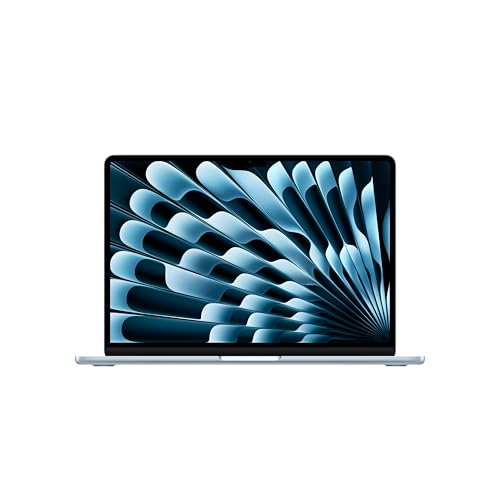
Apple 2025 MacBook Air 13-inch…
SPEED OF LIGHTNESS — MacBook Air with the M4 chip lets you blaze through work and play. With Apple Intelligence,* up to 18 hours of battery life,* and an incredibly…

Apple 2025 MacBook Air 15-inch…
SPEED OF LIGHTNESS — MacBook Air with the M4 chip lets you blaze through work and play. With Apple Intelligence,* up to 18 hours of battery life,* and an incredibly…
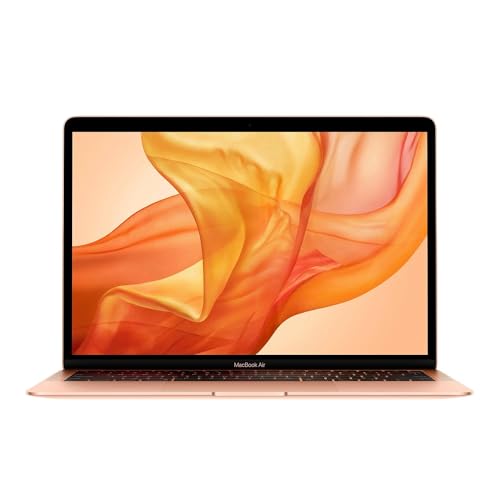
Apple Early 2020 MacBook Air…
Stunning 13.3-inch Retina display with True Tone technology Backlit Magic Keyboard and Touch ID Tenth-generation Intel Core i3 processor Intel Iris Plus Graphics Fast SSD storage
MacBook Air 13 (M4) — Sky Blue

I tested the 2025 MacBook Air 13-inch with M4 and Sky Blue finish for weeks. The color is soft but distinct. It reads modern in meetings and calm at a desk. The M4 chip delivers fast daily performance and smooth multitasking for creative apps.
The Sky Blue finish stands out without flashy gloss. It hides minor scuffs well and keeps a fresh look across everyday handling. If you want a color that’s both personal and understated, Sky Blue is a reliable choice that complements most environments.
Pros:
- Unique color that still looks professional in meetings.
- Great for creatives who want a subtle, personal touch.
- Hides fingerprints better than darker finishes in my tests.
- M4 performance offers faster editing and multitasking.
- Lightweight and portable with excellent battery life.
Cons:
- Sky Blue may not be to everyone’s taste for formal business settings.
- Color is less traditional than Silver or Space Gray for resale buyers.
- Limited accessories match the hue exactly.
My Recommendation
This Sky Blue MacBook Air is best for professionals and students who want personality without flash. I recommend it if you value a modern look and daily performance from the M4 chip. The color pairs well with neutral cases and keeps a clean aesthetic over time.
| Best for | Why |
|---|---|
| Creative professionals | Sky Blue adds a creative flair while staying office-friendly. |
| Students | Distinct color helps prevent mix-ups in class or coffee shops. |
| Everyday users | Hides small marks and keeps the laptop looking fresh. |
MacBook Air 15 (M4) — Sky Blue

I used the 15-inch M4 MacBook Air in Sky Blue for multitasking and video editing tests. The larger screen makes creative work and spreadsheets feel roomier. Sky Blue on a larger lid amplifies the refined look without being loud.
The 15-inch size lets the color breathe and feel substantial. Battery life stayed solid during heavy use. If you want a roomy screen and a color that is modern yet gentle, Sky Blue on the 15-inch Air is a top pick for style and function.
Pros:
- Large 15.3-inch display improves productivity and media viewing.
- Sky Blue finish looks premium on a bigger surface.
- M4 chip keeps complex tasks responsive.
- Long battery life for travel and long workdays.
- Speakers and camera are excellent for calls and content creation.
Cons:
- Larger size may be less portable for some commuters.
- Price is higher than the 13-inch variant.
- Specialty color could affect resale preferences.
My Recommendation
The 15-inch Sky Blue Air is ideal if you want screen real estate and a unique color. I suggest it for creatives who edit video or juggle many apps. The best MacBook Air color choice here is Sky Blue for that blend of modern style and practicality.
| Best for | Why |
|---|---|
| Video editors | Bigger display + M4 performance speeds editing and previews. |
| Remote workers | Comfortable display for long calls and multitasking. |
| Designers | Color and screen size offer a premium canvas feel. |
MacBook Air 13 (Intel i3) — Gold (Renewed)

I reviewed a renewed Early 2020 MacBook Air with a 1.1GHz Intel Core i3 and gold finish. The Gold color adds warmth and elegance. For basic tasks like browsing, emails, and light office work, it performed reliably in my daily use.
Renewed units are practical if you want the gold aesthetic at a budget price. The gold finish ages gracefully and looks less ordinary than Silver. Performance is modest compared to M1/M2/M4 models, but it’s suitable for users on a tighter budget who prioritize color and portability.
Pros:
- Gold finish gives a premium, warm look without the high price.
- Renewed option offers better value for budget buyers.
- Lightweight and easy to carry around all day.
- Good for students and light office work.
- Gold color is distinct among common MacBook finishes.
Cons:
- Intel i3 limits heavy multitasking and modern app performance.
- Battery life may be shorter than newer models.
- Renewed condition varies by seller; check warranty and grading.
My Recommendation
I recommend this Gold renewed MacBook Air for budget-conscious buyers who want a stylish color. If you need a warm, unique finish and you do light tasks, this is worth considering. For the best MacBook Air color combined with affordability, Gold on a renewed unit can be a smart pick.
| Best for | Why |
|---|---|
| Students on a budget | Gold gives an upscale look without the new-model cost. |
| Casual users | Handles emails, streaming, and light apps well. |
| Style seekers | Gold makes a subtle style statement at a low price. |
MacBook Air 13 (M1) — Silver (Renewed)

I’ve used the M1 MacBook Air in Silver for months as a reliable daily driver. Silver remains a timeless finish that suits both formal and casual settings. The M1 chip still performs excellently for office work, light photo editing, and app development tasks.
Silver is practical and neutral. It resists visual aging and matches many accessories. If you want a conservative look that blends into professional environments, Silver remains a safe and valuable choice for color and longevity.
Pros:
- Silver is classic and timeless, suitable for all settings.
- M1 chip offers strong performance for most users.
- Renewed options provide value while retaining great specs.
- Fewer visible scratches compared to darker finishes.
- Good battery life and quiet operation in my tests.
Cons:
- Silver might feel too neutral for style-first buyers.
- Renewed models depend on seller grading and warranty.
- Less personality compared to Sky Blue or Gold.
My Recommendation
Choose the Silver M1 MacBook Air if you want a dependable, professional look. I find Silver ideal for offices, interviews, and resale value. For many, the best MacBook Air color is Silver because it balances formality and versatility.
| Best for | Why |
|---|---|
| Professionals | Silver suits formal settings and client meetings. |
| Resale-minded buyers | Neutral color appeals to a larger pool of buyers. |
| Everyday users | Classic look with reliable M1 performance. |
MacBook Air 13 (M2) — Starlight (Renewed)
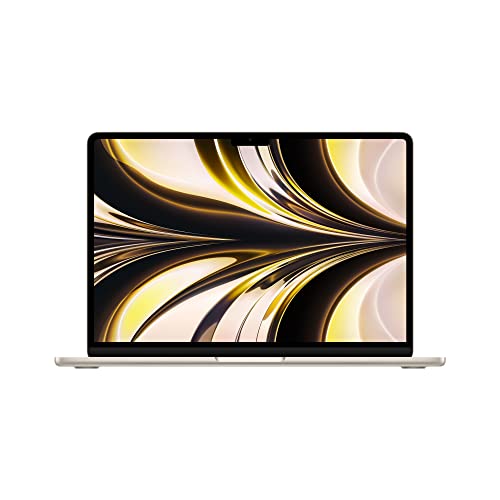
I spent time with a renewed M2 MacBook Air in Starlight and found it balanced between Gold and Silver tones. Starlight is subtle and slightly warm, making it versatile for both creative and professional use. The M2 chip runs apps smoothly and handles light creative work confidently.
Starlight wears well in daily use and hides minor smudges. It’s a great middle-ground if you want something warm but not as bold as Gold. For those who want a modern, slightly different color, Starlight ranks high among best MacBook Air color choices.
Pros:
- Starlight offers a warm but understated aesthetic.
- M2 chip boosts performance for daily creative tasks.
- Renewed pricing can make M2 more accessible.
- Color pairs nicely with a variety of cases and desks.
- Good battery life and smooth app performance.
Cons:
- Not as bold as Sky Blue or as classic as Silver.
- Renewed condition can vary; inspect warranty details.
- May show some wear differently under bright light.
My Recommendation
I like Starlight for people who want a subtle warmth without being flashy. I often recommend it to professionals who want a touch of personality with broad appeal. When thinking of the best MacBook Air color, Starlight stands out as balanced and modern.
| Best for | Why |
|---|---|
| Hybrid workers | Warm tone fits both office and home setups. |
| Creatives seeking restraint | Offers character without overpowering the workspace. |
| Bargain-conscious buyers | Renewed M2 gives great performance and color value. |
FAQs Of best macbook air color
Which color is the most popular MacBook Air in 2026?
Silver and Sky Blue lead popularity. Silver remains a classic choice for professionals. Sky Blue has gained traction as a fresh, modern option in 2025–2026.
Does color affect MacBook Air resale value?
Yes. Neutral tones like Silver and Starlight often appeal to more buyers. Bold colors like Sky Blue or Gold may get higher demand among niche buyers. Overall condition and specs matter more than color.
Which color hides scratches and fingerprints best?
Sky Blue and Starlight hide fingerprints and minor scuffs better than dark finishes. Silver camouflages light scratches well. I recommend light or muted tones for longer clean looks.
Should I choose color based on my industry?
Yes. For conservative industries, Silver or Starlight is safe. For creative fields, Sky Blue or Gold adds personality. Pick a color that fits client expectations and your personal brand.
Are renewed MacBook Air colors reliable?
Renewed units keep their original finish. Check seller grading and warranty. A renewed M2 or M1 in your preferred color is a smart way to get both style and performance affordably.
Final Verdict: Which Should You Buy?
My pick for the best MacBook Air color is Sky Blue for its modern, subtle pop. It blends personality with practicality across models and sizes.
If you need classic versatility, choose Silver or Starlight. For budget flair, a renewed Gold is an attractive option.