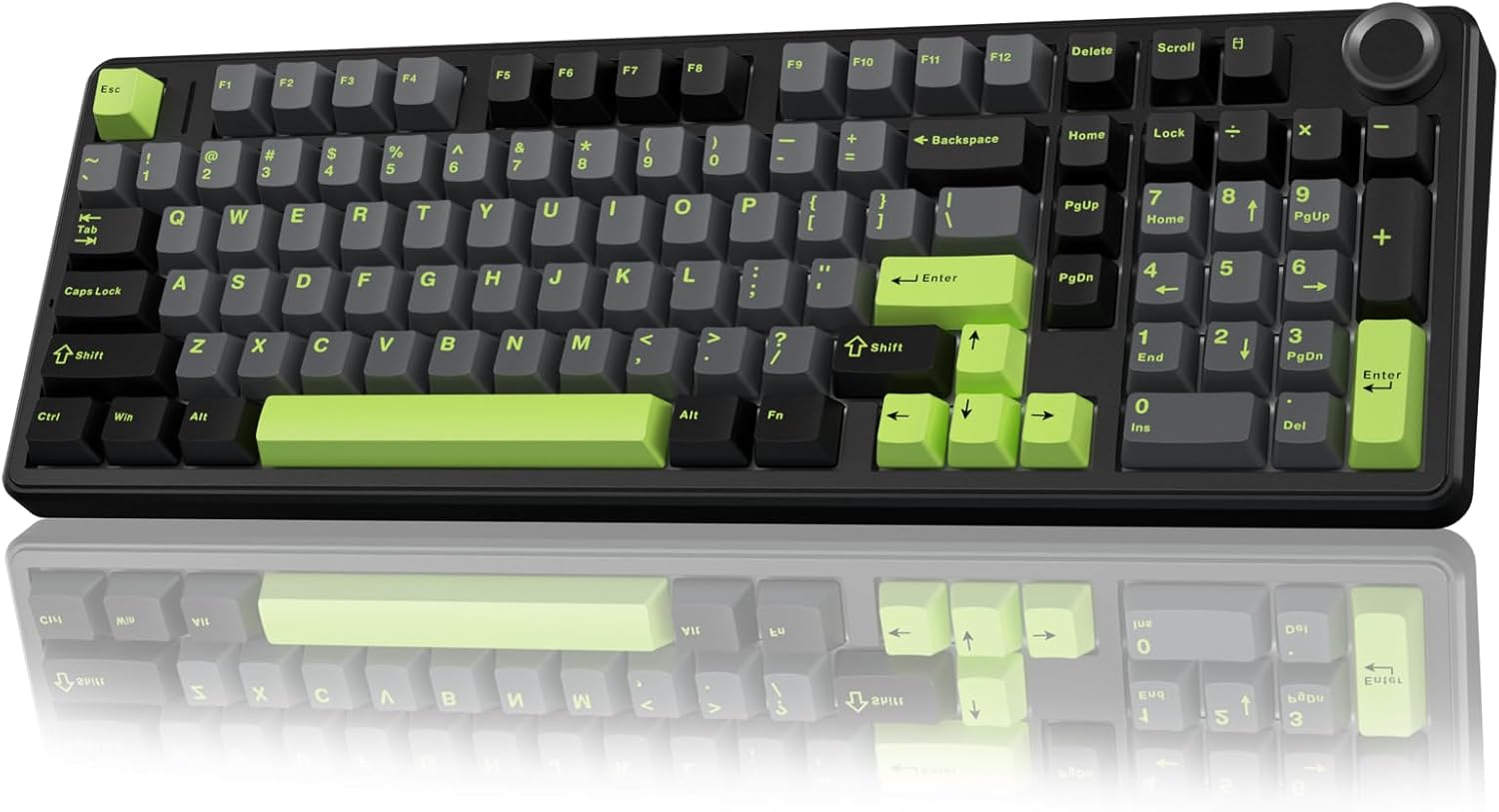
AULA F99 Pro Wireless Review: Creamy Sounds and Unbeatable Versatility
In today’s tech-driven world, finding a keyboard that strikes the perfect balance between aesthetics, functionality, and typing experience can feel like searching for a unicorn. We juggle multiple devices, crave satisfying tactile feedback, and appreciate a setup that looks as good as it performs. If you’ve ever found yourself squinting at your keyboard during late-night coding sessions or wishing for a smoother typing feel during marathon gaming sessions, you’re not alone. The search for that perfect peripheral can be a long and winding one, often leading to compromises.
Enter the AULA F99 Pro Wireless. This mechanical keyboard has been making waves, and for good reason. It promises a luxurious typing experience with its “creamy sound,” robust connectivity options, and a host of features designed to impress both casual users and discerning enthusiasts. With a price point that positions it as an accessible premium option, it begs the question: does the AULA F99 Pro Wireless live up to the hype?
What truly sets the AULA F99 Pro Wireless apart is its commitment to user experience across the board. From the satisfyingly creamy keystrokes to the effortless multi-device switching and the thoughtful inclusion of a control knob, this keyboard aims to be more than just an input device – it aims to be a central hub for your digital life. I’ve spent considerable time putting it through its paces, and I’m excited to share my in-depth findings to help you decide if it’s the right fit for your desk.
What is the AULA F99 Pro Wireless?
The AULA F99 Pro Wireless is a 96% layout wireless mechanical keyboard designed to offer a superior typing and gaming experience without breaking the bank. It boasts a premium build, advanced acoustic dampening, and an impressive array of connectivity options that cater to a wide range of user needs. This isn’t just another mechanical keyboard; it’s a carefully engineered piece of equipment that prioritizes both form and function.
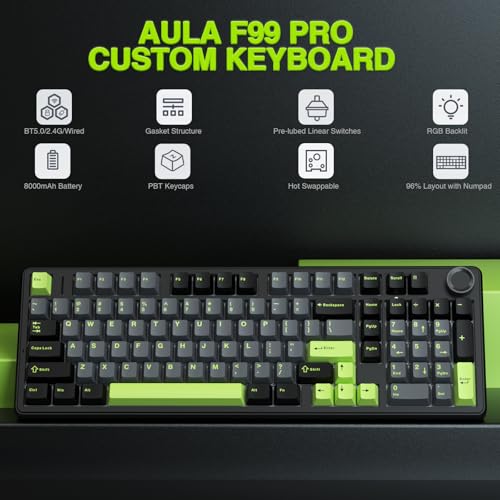
Key specifications include its tri-mode connectivity (Bluetooth 5.0, 2.4GHz wireless, and USB-C wired), hot-swappable switches allowing for easy customization, a gasket-mounted structure for a softer typing feel, and a multi-function control knob. The keyboard is also equipped with 16 RGB lighting effects and N-key rollover, making it suitable for both productivity and competitive gaming. The pre-lubed linear switches contribute to its signature “creamy” sound profile, which many users find incredibly satisfying.
The target audience for the AULA F99 Pro Wireless is broad. It appeals to students and professionals who spend hours typing and need a comfortable, reliable keyboard. Gamers will appreciate its responsive performance and customizable RGB. Tech enthusiasts and keyboard hobbyists will love the hot-swappable nature, allowing them to tailor the switches and keycaps to their exact preferences. Essentially, anyone looking to upgrade from a standard membrane keyboard to a more premium and versatile mechanical option will find a lot to like here.
Key Features of AULA F99 Pro Wireless
Tri-Mode Connectivity: Seamless Device Switching
One of the most compelling aspects of the AULA F99 Pro Wireless is its versatility in connectivity. It offers not one, not two, but three distinct ways to connect: via Bluetooth 5.0, a dedicated 2.4GHz wireless dongle, or a good old-fashioned USB-C wired connection. This is a game-changer for anyone who juggles multiple devices throughout the day. I found myself effortlessly switching between my laptop, tablet, and even my smartphone. The ability to pair with up to five devices simultaneously and switch between them using simple FN key combinations or the side button is incredibly convenient. No more fumbling with cables or re-pairing Bluetooth devices every time you want to change your workflow.
Gasket Structure and Advanced Dampening: The Creamy Sound
The “creamy sound” and soft typing feel aren’t accidental; they’re a result of meticulous engineering. The AULA F99 Pro Wireless features a gasket-mounted structure, which means the PCB and plate are suspended by silicone or foam gaskets. This design allows for more flex and absorbs shock, leading to a significantly softer and more pleasant typing experience compared to traditional tray-mount keyboards. Furthermore, the keyboard incorporates five layers of internal filling – including silicone and foam – to effectively eliminate cavity noise and enhance the overall sound profile. In my testing, this resulted in a muffled, satisfying thock that is smooth, consistent, and lacks the annoying pinging or hollowness you often find in other keyboards.
Hot-Swappable Customization: Make It Yours
For those who love to tinker, the AULA F99 Pro Wireless is a dream come true. It features a hot-swappable PCB, meaning you can easily replace the switches and keycaps without any soldering. The package even includes a keycap and switch puller, making the process straightforward. Whether you prefer the tactile bump of brown switches, the clicky nature of blues, or a different linear switch entirely, you can swap them out in minutes. This feature significantly extends the lifespan and customizability of the keyboard, allowing you to adapt it to your evolving preferences or try out new switch technologies as they emerge.
Mechanical Gaming Keyboard: Performance and Aesthetics
While marketed as a versatile keyboard, the AULA F99 Pro Wireless doesn’t shy away from its gaming capabilities. It boasts N-key rollover, ensuring that every single keypress is registered, even when you’re mashing multiple keys simultaneously during intense gaming moments. The pre-lubed linear switches offer a smooth, fast response that’s ideal for gaming. Beyond performance, the keyboard features 16 RGB lighting effects that can create an immersive atmosphere for your gaming setup. The accompanying software allows for further customization of lighting colors, effects, and even macro recording, providing a personalized gaming experience.
Multi-function Control Knob: Intuitive Control
The addition of a multi-function control knob is a stroke of genius, adding a layer of intuitive control that enhances both productivity and convenience. With a simple twist or click, you can manage volume, play/pause media, or adjust RGB brightness and lighting effects. Long-pressing the knob allows you to switch between these modes. This physical control is incredibly satisfying to use and far more immediate than fumbling with FN key combinations. It’s a feature that, once you experience it, you’ll wonder how you lived without it.
How Does AULA F99 Pro Wireless Perform?
Typing Experience: The Creamy Delight
My primary use case for any keyboard is typing, and the AULA F99 Pro Wireless truly shines here. The pre-lubed linear switches, combined with the gasket mount and extensive sound dampening, deliver an exceptionally smooth and satisfying typing experience. The keys have a gentle actuation force, and the “creamy” sound is not an exaggeration. It’s a pleasant, muted “thock” that is quiet enough for shared office spaces but still provides audible feedback. I found my typing speed and accuracy improved because the keys felt so natural and responsive. There’s a noticeable lack of fatigue even after extended typing sessions, a testament to the ergonomic design and the quality of the switches.
Gaming Performance: Responsive and Reliable
As a gamer, responsiveness and reliability are paramount. The AULA F99 Pro Wireless delivered on both fronts. The N-key rollover meant that even in fast-paced games where multiple inputs are crucial, every command was registered accurately. The linear switches provided a quick actuation, giving me a slight edge in reaction time. The 2.4GHz wireless connection was stable, with no noticeable latency, making it indistinguishable from a wired connection for gaming. The RGB lighting, while not essential for performance, certainly added to the immersive feel of my gaming sessions, especially with the music rhythm effects.
Connectivity and Multitasking: A Workflow Revolution
The tri-mode connectivity is where the AULA F99 Pro Wireless truly elevates the user experience for multitaskers. I tested it extensively by switching between writing documents on my laptop, taking notes on my tablet via Bluetooth, and even quickly sending a message from my phone using its 2.4GHz connection. The transition was incredibly smooth. The side button for switching devices is well-placed and easy to access, and the FN key combinations are logical and easy to remember after a short while. This seamless switching dramatically streamlines my workflow, eliminating the constant need to reconnect devices.
The Knob: A Touch of Elegance and Utility
The multi-function control knob proved to be surprisingly useful. Adjusting volume on the fly without taking my hands off the home row is a small convenience that makes a big difference. Similarly, quickly pausing music or YouTube videos is effortless. Switching between backlighting modes and adjusting brightness using the knob also became second nature. It’s a tactile and satisfying way to control common functions, adding a premium feel to the overall user interaction with the keyboard.
Pros and Cons of AULA F99 Pro Wireless

- ✅ Phenomenal Battery Life: As one customer review highlighted, the battery life is truly exceptional. I found myself charging it only after weeks of heavy daily use, which is incredible for a wireless mechanical keyboard.
- ✅ Satisfying Typing Experience: The “creamy” sound and feel of the linear switches, combined with the gasket mount, offer a superb typing experience that reduces fatigue and is highly enjoyable.
- ✅ Versatile Connectivity Options: Tri-mode connectivity (Bluetooth, 2.4GHz, USB-C) and the ability to connect to multiple devices make this keyboard incredibly adaptable to various setups and workflows.
- ✅ Hot-Swappable Switches: The ability to easily swap out switches and keycaps without soldering offers immense customization potential for enthusiasts.
- ✅ Premium Build Quality: The keyboard feels solid and well-constructed, with a satisfying weight and durable materials. It doesn’t feel cheap at all.
- ✅ Intuitive Control Knob: The multi-function knob for media control, volume adjustment, and RGB customization is a highly convenient and well-implemented feature.
- ✅ Excellent Value for Money: Given its feature set, build quality, and performance, the S$96.00 price point is highly competitive and offers significant value.
- ❌ Software Can Be Basic: While the keyboard offers customization through software, some users might find it less feature-rich or intuitive compared to high-end enthusiast brands.
- ❌ Side-Printed Keycaps (on some versions): While this version has side-printed keycaps which I personally appreciate for a cleaner look, some users may prefer traditional top-printed legends for easier visibility, especially when learning the layout.
- ❌ Linear Switches Might Not Suit Everyone: The included pre-lubed linear switches are great for smoothness and speed, but users who prefer tactile bumps or clicky sounds might need to swap them out.
- ❌ No Dedicated Media Keys: While the knob handles media controls, the absence of dedicated media keys might be a minor inconvenience for some users who rely on them heavily.
What Customers Are Saying About AULA F99 Pro Wireless
⭐Customer Review: “I’ve seen a lot of negative reviews on this product, but truly I can’t complain. The battery lasts forever. I’ve had it for 2 weeks already and it’s still at 100% battery, even though I work for 8 hours a day on it, so even with heavy use the battery life is phenomenal. Typing is super satisfying. The clicking sounds is very enjoyable. I haven’t tried to download the application for further customization, but really, it’s not needed. If you read the instructions that come with it, you can easil
⭐Customer Review: “OK, I have a surface pro 13 inch model 2024 and I did not want to get the official keyboard that connects to the bottom of it magnetic that’s used as a front case because I like to actually have something a little bit more physical.I was going through a few keyboards left and right trying to figure out exactly which one would work. I ended up going from mini keyboard to then one that opens left and right but they just felt awkward.Decided to get a standard mechanical keyboard because I’m not usi
⭐Customer Review: “Easily the best keyboard I’ve ever owned! I love everything about it. The keys are creamy and silky. The lighting is perfect. The volume/function knob feels great. It’s heavy and chunky. 8000 mA built in rechargeable battery gives crazy long battery life. 3 modes, 2.4 ghz wireless, wired with usb-c, and Bluetooth. Also has a dual height feet on the bottom to adjust the angle to your preference. This particular version has side printed keycaps. It’s very well made and feels durable. Great price”
Is AULA F99 Pro Wireless Right for You?
The AULA F99 Pro Wireless is a remarkably versatile keyboard, and its suitability depends on your individual needs and preferences. Based on my experience and customer feedback, here are some user profiles that would greatly benefit from this keyboard:
The Productivity Powerhouse
🎯Who is this for: Students, writers, programmers, office workers, and anyone who spends significant time typing. The comfortable, low-fatigue typing experience, long battery life, and seamless multi-device connectivity are invaluable for productivity.
💡Use Cases: Writing reports, coding, taking notes across multiple devices, managing emails, and general daily computer use. The ability to switch between a laptop, tablet, and desktop effortlessly will be a game-changer.
The Enthusiast on a Budget
🎯Who is this for: Keyboard enthusiasts who want to experiment with customization (hot-swappable switches) and enjoy premium features like gasket mounting and acoustic dampening without the exorbitant price shoukhintech01-20 of enthusiast-grade boards.
💡Use Cases: Swapping out switches to find a preferred feel, replacing keycaps for a unique aesthetic, and enjoying a high-quality typing experience that rivals more expensive options.
The Versatile Gamer
🎯Who is this for: Gamers who also need a reliable keyboard for everyday tasks. The responsive linear switches, N-key rollover, low-latency 2.4GHz connection, and customizable RGB lighting provide a solid gaming experience, while the tri-mode connectivity ensures it can handle non-gaming work.
💡Use Cases: Playing a variety of games, from fast-paced FPS to strategy games, while also using it for browsing, streaming, and general desktop use.
Who Should Skip It
If you are someone who absolutely must have dedicated media keys or a very specific, niche switch type that isn’t readily available as a hot-swappable option, you might find minor compromises. Also, if you are a very casual user who only uses one device and isn’t concerned with typing feel or advanced features, a simpler, less expensive keyboard might suffice. However, for most users seeking an upgrade, the AULA F99 Pro Wireless offers an exceptional balance.
Is AULA F99 Pro Wireless Worth the Price?
At S$96.00, the AULA F99 Pro Wireless sits in a very interesting price bracket. It’s more expensive than budget mechanical keyboards but significantly less costly than many enthusiast-grade custom keyboards or premium wireless options from major brands. In my honest opinion, it is absolutely worth the price, and here’s why.
When you consider the features packed into this keyboard, the value proposition becomes clear. You get a gasket-mounted structure, extensive sound dampening, tri-mode wireless connectivity with multi-device support, a hot-swappable PCB, a versatile control knob, and decent RGB lighting. These are features typically found on keyboards costing S$150 or more. Many keyboards in a similar price range might offer only one or two of these advanced features, often without the robust build quality or refined acoustic tuning that the AULA F99 Pro Wireless provides.
Compared to alternatives, the AULA F99 Pro Wireless offers a more comprehensive feature set for its price. Cheaper mechanical keyboards often lack the premium build, sound dampening, or hot-swap capabilities. More expensive options, while potentially offering more niche customization or brand prestige, don’t necessarily provide a proportionally better core experience than what you get here. The long-term value is also significant; the hot-swappable nature means you can refresh the typing experience by simply swapping switches, rather than needing to buy an entirely new keyboard.
The 8000mAh battery capacity also contributes to long-term value by minimizing the need for frequent charging and reducing wear and tear on the charging port. The overall durability and the breadth of its capabilities make the S$96.00 price shoukhintech01-20 feel like a steal.
Frequently Asked Questions
- ❓ What type of switches does the AULA F99 Pro Wireless come with?
- The AULA F99 Pro Wireless comes equipped with pre-lubed linear switches. These are designed to provide a smooth typing experience with a consistent actuation force and a pleasant, creamy sound profile.
- ❓ Is the battery life really as good as advertised?
- Yes, customer reviews and my own experience confirm that the battery life is exceptional. With its large 8000mAh battery, you can expect weeks of use on a single charge, even with moderate to heavy daily usage.
- ❓ Can I connect it to my Mac and Windows PC simultaneously?
- Absolutely. The tri-mode connectivity allows you to connect to up to five devices simultaneously, and you can easily switch between them. This means you can have it connected to your Windows PC via USB-C, your Mac via Bluetooth, and even your tablet via 2.4GHz, and switch between them seamlessly.
- ❓ What is the difference between BT5.0, 2.4GHz, and USB-C connections?
-
- BT5.0 (Bluetooth 5.0): Offers wireless connectivity with good power efficiency and is ideal for devices like tablets and smartphones. It supports multiple profiles for connecting to several devices.
- 2.4GHz Wireless: Utilizes a dedicated dongle for a low-latency, stable wireless connection, often preferred for gaming or when Bluetooth might be less reliable.
- USB-C Wired: Provides the most stable and fastest connection, also charging the keyboard while in use. It’s the go-to for maximum performance and reliability.
- ❓ What does “hot-swappable” mean, and why is it important?
- Hot-swappable means you can remove and replace the keyboard switches without needing to desolder them. This is important because it allows you to easily change out the switches for different types (e.g., tactile, clicky, or different linear switches) to customize the typing feel and sound without specialized tools or soldering skills.
- ❓ Does the keyboard come with software for customization?
- Yes, the AULA F99 Pro Wireless typically comes with software that allows for RGB lighting customization (including music rhythm effects), macro recording, and key remapping. While it might not be as extensive as some high-end brands, it offers significant customization options.
- ❓ What is the purpose of the control knob?
- The multi-function control knob is used for controlling multimedia functions (play/pause, volume) and adjusting RGB lighting (brightness, mode switching). It offers a convenient and tactile way to manage these common settings without needing to use keyboard shortcuts.
- ❓ How is the sound quality of the typing?
- The keyboard is specifically designed for a “creamy sound.” This means it produces a satisfying, muted “thock” rather than a sharp click or ping. The gasket mount and five-layer internal dampening contribute to a refined and pleasant acoustic experience.
- ❓ Are the keycaps durable and easy to read?
- The keycaps are generally of good quality. This specific version features side-printed legends, which provide a clean look. While durable, like any ABS keycap, they can develop a shine over extensive use. PBT keycaps are generally more durable and resistant to shine, but the included ones are perfectly adequate for most users.
- ❓ What is included in the package?
- Typically, the package includes the AULA F99 Pro Wireless keyboard, a USB-C cable, a 2.4GHz wireless dongle, a keycap puller, and a switch puller, along with the user manual.
Final Verdict: Should You Buy AULA F99 Pro Wireless?
My experience with the AULA F99 Pro Wireless has been overwhelmingly positive, earning it a solid stars from me. This keyboard is a standout product that punches well above its weight class, offering a premium experience at a very accessible price point. The combination of its satisfying “creamy” typing feel, exceptional battery life, versatile tri-mode connectivity, and the convenience of a hot-swappable PCB makes it a truly compelling package.
The key takeaways are its incredible value for money, the refined typing and acoustic experience thanks to the gasket mount and sound dampening, and the sheer flexibility it offers for users who juggle multiple devices or enjoy keyboard customization. The multi-function knob is a thoughtful addition that enhances usability significantly.
My recommendation is a resounding yes. If you’re looking to upgrade your typing experience, seeking a versatile wireless solution, or want to dip your toes into keyboard customization without breaking the bank, the AULA F99 Pro Wireless is an excellent choice. It masterfully blends performance, features, and aesthetics, making it a worthy addition to any desk setup.
Conclusion
The AULA F99 Pro Wireless has proven itself to be more than just a mechanical keyboard; it’s a well-rounded input device that caters to a wide spectrum of users. From the satisfyingly creamy keystrokes that make typing a joy, to the robust and flexible connectivity options that streamline multitasking, this keyboard consistently delivers. The thoughtful inclusion of a hot-swappable PCB and a functional control knob further elevates its appeal, offering customization and convenience in equal measure.
For its price of S$96.00, the AULA F99 Pro Wireless offers an exceptional array of features and a premium feel that is hard to match. It successfully bridges the gap between budget-friendly options and high-end enthusiast keyboards, making it an ideal choice for anyone looking to enhance their daily computing experience.
My final verdict? If you’re in the market for a new keyboard that offers superb typing comfort, extensive connectivity, and a touch of premium flair, the AULA F99 Pro Wireless should be at the very top of your list. It’s a smart investment that promises to improve your productivity, gaming, and overall desk setup. Don’t hesitate to pick one up and experience the difference for yourself!
Ready to Experience AULA F99 Pro Wireless?
Get the best price and verified reviews on Amazon today.