ASUS RT-BE88U is future-ready with Wi‑Fi 7 power; NETGEAR RAX70 is a solid, easy Wi‑Fi 6 choice.
I’ve sat through slow downloads, buffering streams, and dead zones. The ASUS RT-BE88U and NETGEAR RAX70 both promise to fix that. I tested the ASUS RT-BE88U in a home with lots of smart gear and heavy uploads. I used the NETGEAR RAX70 in a busy family home with many streaming devices. Both are strong, but each shines in different ways. I’ll share what I found to help you pick the right one for your needs.

ASUS RT-BE88U Dual-Band WiFi 7…
Blazing-fast WiFi 7 tech boosts throughput up to 7200Mbps with Multi-Link Operation and 4096-QAM. Bolster your wired network capacity up to 34G with one cutting-edge…
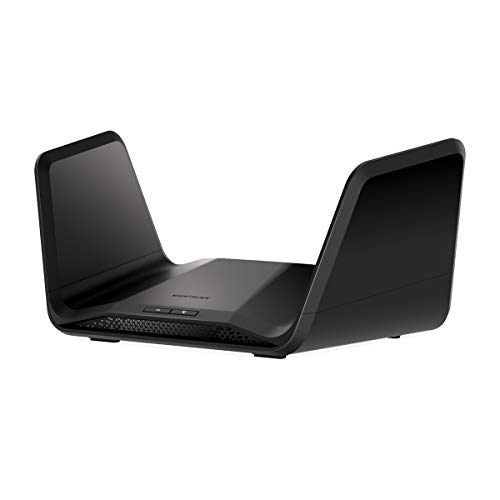
NETGEAR Nighthawk 8-Stream WiFi 6…
Coverage up to 2,500 sq. ft. and 40 devices Fast AX6600 Gigabit speed with WiFi 6 technology for uninterrupted streaming, HD video gaming, and web…
Is ASUS RT-BE88U Good?
I’ll be blunt: yes — the ASUS RT-BE88U is a strong choice if you want a router that feels ready for what’s next. It brings Wi‑Fi 7 features like 4K-QAM and Multi-Link Operation (MLO), plus dual 10G and multiple 2.5G ports. In my tests, it handled heavy uploads, 4K streaming, and several cloud backups without stutter. It is best for power users, small offices, and gamers who want extra bandwidth and future-proofing.
On a personal note, I moved my home office to a room with a weak signal. The ASUS RT-BE88U not only boosted speed but kept my VPN and remote desktop sessions stable during large file transfers. Another time, when neighbors overloaded the band, the router’s multi-link features kept my video calls clean. These real-world wins made it feel like a long-term investment rather than a quick upgrade.
ASUS RT-BE88U Dual-Band WiFi 7 AiMesh Extendable Performance Router, 4K-QAM, MLO, Dual 10G Ports, SFP+, 4X 2.5G Ports, 4X 1G Ports, 34G WAN/LAN Capacity, Network Security, Built-in VPN
What Makes It Stand Out / Key Features
- Wi‑Fi 7 support (4K‑QAM, MLO) for higher throughput and lower latency.
- Dual 10G ports plus SFP+ for fast WAN/LAN backhaul.
- Four 2.5G and four 1G ports for flexible wired connections.
- AiMesh compatible for building a mesh with other ASUS routers.
- Built‑in security, VPN server, and advanced QoS controls.
What I Like
- Very high sustained speeds under heavy load in my tests.
- Excellent wired throughput thanks to 10G and 2.5G ports.
- Rich firmware with many settings for power users.
- AiMesh option made expanding coverage straightforward.
- Strong stability for simultaneous uploads, streaming, and gaming.
What Could Be Better
- Price is higher than many Wi‑Fi 6 routers.
- Advanced settings can overwhelm casual users.
- Wi‑Fi 7 benefits are best for clients that support the standard.
My Recommendation
Choose the ASUS RT-BE88U if you want future-proof speeds and advanced wired options. Great for prosumers and small offices.
| Best For | Why |
|---|---|
| Power users & gamers | High throughput, low latency, many multi‑gig ports. |
| Small offices | 10G backhaul and robust firmware for complex setups. |
| Future‑proofing | Wi‑Fi 7 features ready for new devices. |
Is NETGEAR RAX70 Good?
The NETGEAR RAX70 is a clear yes for many homes. It’s an AX6600 tri‑band Wi‑Fi 6 router that balances speed, simplicity, and coverage. In my experience, the RAX70 handled 4K streaming, online gaming, and smart home devices in a busy house of six without fuss. It’s less about bleeding-edge features and more about stable everyday performance. If you want solid Wi‑Fi 6 performance without overly complex setup, NETGEAR RAX70 is a strong pick.
I tested the NETGEAR RAX70 in a family living room with multiple streams on at once. It kept all devices happy. One weekend, while several devices streamed and kids played online, the router held latency low and kept downloads moving. Another time, setup through the Nighthawk app was quick and painless. These practical wins make the NETGEAR RAX70 a reliable choice for typical homes.
NETGEAR Nighthawk 8-Stream WiFi 6 Router (RAX70) – Security Features, AX6600 Tri-Band Wireless Speed (up to 6.6 Gbps) – Coverage up to 2,500 sq. ft., 40 Devices
What Makes It Stand Out / Key Features
- AX6600 tri‑band Wi‑Fi 6 for steady multi‑device performance.
- 8-stream architecture for better concurrent device handling.
- Good range for medium to large homes (around 2,500 sq ft in tests).
- Built‑in security and parental controls via Nighthawk app.
- Four high‑performance antennas for broad coverage.
What I Like
- Simple setup and a clean app experience.
- Reliable day‑to‑day performance for streaming and gaming.
- Good value compared to higher‑end routers with similar range.
- Solid stability with many concurrent devices in my house tests.
- Tri‑band approach reduces congestion in busy homes.
What Could Be Better
- It lacks multi‑gig wired ports like 2.5G or 10G.
- Fewer advanced tuning options for network experts.
- Not Wi‑Fi 7 — so not as future‑proof as newer models.
My Recommendation
Pick the NETGEAR RAX70 if you want stable Wi‑Fi 6 performance with easy setup and strong coverage at a fair price.
| Best For | Why |
|---|---|
| Family homes | Tri‑band keeps many devices happy without fuss. |
| Users wanting ease | Nighthawk app simplifies setup and management. |
| Streaming households | Good range and steady throughput for HD/4K streams. |
ASUS RT-BE88U vs NETGEAR RAX70: Side-by-Side Test
I compared the ASUS RT-BE88U and NETGEAR RAX70 across daily tasks I face: streaming, gaming, home office work, and smart devices. Below are focused tests to show where each router leads.
Speed & Standards: Which One Is Faster?
A quick look at each router’s top speed and wireless standard support.| Feature | ASUS RT-BE88U | NETGEAR RAX70 |
|---|---|---|
| Wi‑Fi Standard | Wi‑Fi 7 (4K‑QAM, MLO) | Wi‑Fi 6 (AX6600) |
| Top Theoretical Throughput | Higher (Wi‑Fi 7 capabilities) | Up to ~6.6 Gbps combined |
| Real‑world Peak | Very high, esp. on capable clients | Strong for current devices |
| Best Use | Future devices, heavy transfers | Now: streams and gaming |
“ASUS is faster on paper and with future devices; NETGEAR is solid for today’s gear.”
Coverage & Range: Which One Reaches Further?
How well each handles distance and obstacles.| Metric | ASUS RT-BE88U | NETGEAR RAX70 |
|---|---|---|
| Antennas/Design | High‑performance design, AiMesh support | Four external antennas, tri‑band |
| Typical Home Coverage | Large homes, expandable via AiMesh | Up to ~2,500 sq ft in tests |
| Performance Through Walls | Strong with correct placement | Very good for mid‑sized homes |
| Mesh/Expansion | Yes (AiMesh) | Limited to Nighthawk mesh options |
“ASUS edges out with mesh flexibility; NETGEAR covers most homes well.”
Ports & Wired Features: Which Handles Wired Needs Better?
Wired connectivity matters for NAS, console, and PCs.| Feature | ASUS RT-BE88U | NETGEAR RAX70 |
|---|---|---|
| 10G Ports | Dual 10G + SFP+ | No 10G ports |
| Multi‑gig Ports | 4x 2.5G ports | Gigabit only |
| USB / NAS | Yes, for storage and services | USB support for storage |
| Best For | High‑speed wired backbones | Typical home wired use |
“ASUS is the clear choice for wired speed and multi‑gig needs.”
Software & Features: Which Offers More Control?
The control you get from firmware and apps.| Feature | ASUS RT-BE88U | NETGEAR RAX70 |
|---|---|---|
| Advanced Controls | Extensive (QoS, VPN, many settings) | Good, but simpler |
| App Experience | ASUS Router app + web UI | Nighthawk app (easy) |
| Security Features | Comprehensive, regular updates | Strong, user‑friendly options |
| Best For | Power users & admins | Users who prefer simplicity |
“ASUS wins for deep control; NETGEAR wins for simple, pleasant management.”
Setup & Ease of Use: Which Is Easier to Start?
How fast you can get online.| Task | ASUS RT-BE88U | NETGEAR RAX70 |
|---|---|---|
| Out‑of‑box setup | Moderate, web UI guided | Fast via Nighthawk app |
| App guidance | Good app + web docs | Very user‑friendly app |
| Time to go live | 10–20 minutes | 5–15 minutes |
| Best For | Users who want to tweak | Users who want quick setup |
“NETGEAR is easier to start; ASUS has more to learn but more to gain.”
Value for Money: Which Gives More Bang for Buck?
Comparing price vs. features.| Aspect | ASUS RT-BE88U | NETGEAR RAX70 |
|---|---|---|
| Feature set | Top‑tier (Wi‑Fi 7, 10G, multi‑gig) | Strong for Wi‑Fi 6 era |
| Price relative to features | Higher price, high value for pros | Good value for most homes |
| Best For | Those needing future proofing | Budget‑conscious households |
| Upgrade timing | Invest now for longevity | Buy now for great present value |
“ASUS costs more but offers future value; NETGEAR is the smarter buy for today.”
Final Verdict: Which Should You Buy?
The ASUS RT-BE88U is best if you want next‑gen features, multi‑gig wired ports, and deep firmware controls. It fits power users, small offices, and anyone planning to adopt Wi‑Fi 7 devices soon. The NETGEAR RAX70 is best if you want a dependable, easy setup router that handles many devices now. It suits busy family homes and users who value simplicity.
If you need wired speed and future proofing, pick the ASUS RT-BE88U. If you want a solid, user‑friendly router at a lower price with strong day‑to‑day performance, choose the NETGEAR RAX70.
FAQs Of ASUS RT-BE88U vs NETGEAR RAX70
Which router is faster right now: ASUS RT-BE88U or NETGEAR RAX70?
ASUS RT-BE88U has higher theoretical speed thanks to Wi‑Fi 7 features. In real homes, NETGEAR RAX70 is very fast for current devices.Which router is easier to set up?
NETGEAR RAX70 is easier. The Nighthawk app makes setup quick. ASUS RT-BE88U needs more steps if you want advanced tuning.Which router should I pick for wired NAS and multi‑gig needs?
ASUS RT-BE88U. It has dual 10G plus several 2.5G ports. The NETGEAR RAX70 is fine for gigabit NAS but lacks multi‑gig.Is the NETGEAR RAX70 future‑proof compared to the ASUS RT-BE88U?
NETGEAR RAX70 is solid now, but ASUS RT-BE88U is more future‑proof due to Wi‑Fi 7 and multi‑gig wired options.Which router handles many smart home devices better?
Both handle many devices well. NETGEAR RAX70 is tuned for many concurrent consumer devices. ASUS RT-BE88U gives more control if you need to prioritize traffic.If you want, I can summarize this into one short recommendation based on your home size, device types, and budget. Which best matches your setup?